Validating DTD Parser
<%=ConfigurationManager.AppSettings["SS"]%> 5.1 fully supports XML document validation based on DTD (in addition to full support for W3C XML Schema) to ensure compatibility with legacy XML systems. DTDs can be internally or externally defined. To associate any open XML file with an externally defined DTD, click XML > Associate XML with Schema from the <%=ConfigurationManager.AppSettings["SS"]%> menu.
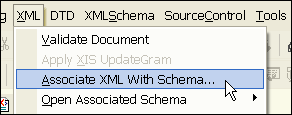
Specify Any Third-Party XML Parsers and Validators
<%=ConfigurationManager.AppSettings["SS"]%> supports a Universal DTD Parsing and Validation Architecture — you can perform a DTD-based XML document validation using <%=ConfigurationManager.AppSettings["SS"]%>'s internal DTD validating parser, or you can use any third-party validating DTD parsers (DTD validators) such as MSXML 4.0 SAX, MSXML 4.0 DOM, Microsoft .NET XML Parser (System.XML), Apache Xerces-J 2.5.1, and more. Validating an XML document against its associated DTD is easy — simply click the Validate Document button (the tree diagram with the green checkmark) in <%=ConfigurationManager.AppSettings["SS"]%>'s XML Editor, then select the DTD validating parser you want to use.
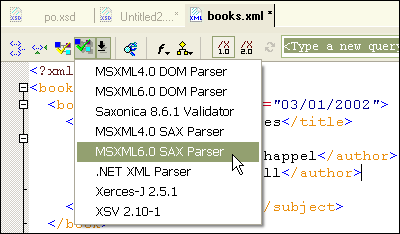
The ability to directly integrate any DTD processor and DTD validator with <%=ConfigurationManager.AppSettings["SS"]%>'s intuitive visual XML editors enables you to easily troubleshoot XML documents, making <%=ConfigurationManager.AppSettings["SS"]%> the XML editor of choice for both DTD- and XML Schema-based XML document authoring.
Real-Time Syntax Checking and DTD Validation Error Reporting
<%=ConfigurationManager.AppSettings["SS"]%> provides both real-time syntax checking and a powerful error reporting console to help find and correct syntax errors, thereby reducing testing and QA cycles and accelerating overall XML development. Real-time XML syntax checking verifies that your XML code's syntax is well formed and checks it's validity (against its DTD) as you type. Sense:X highlights XML syntax errors in real-time, and its auto-completion mechanism displays contextually valid prompts to help speed coding. <%=ConfigurationManager.AppSettings["SS"]%> automatically detects any changes in the associated DTD, eliminating the need to manually refresh so you know your code will always be accurate.
In the following illustration, <%=ConfigurationManager.AppSettings["SS"]%>'s real-time syntax checking has reported an error with the <titles> element — this element is not defined in its respective Document Type Definition, so it is highlighted in orange during editing, and it is reported in the output window at the time the XML is validated.
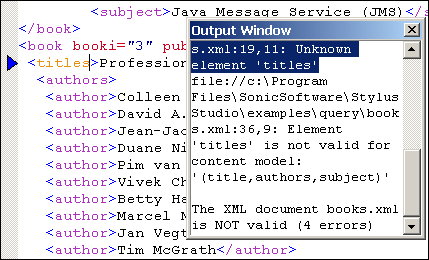
Any error messages resulting from a failed XML validation attempt are written to an error console. <%=ConfigurationManager.AppSettings["SS"]%>'s Output window can handle multiple XML parsing or XML validation errors. Each error is displayed in its own Output window and includes a useful error message and a corresponding line number explaining the nature of the underlying XML parsing or validation error.
Backmapping
Thanks to <%=ConfigurationManager.AppSettings["SS"]%>'s thoughtful Backmapping technology, you can click on any DTD validation error message in the Ouput window, and <%=ConfigurationManager.AppSettings["SS"]%> automatically highlights the line of source code in which the problem originates. You can cycle through multiple errors by pressing the F4 key. Backmapping is a powerful debugging/troubleshooting tool, one that you'll quickly grow to appreciate.
Integrate Any Third-Party DTD Validator or DTD Processor
Configuration of a third-party DTD validation and parsing engine is done in the Options dialog box, as shown here. Our Open XML Parsing and XML Validation Architecture guarantees development support for the same XML processor and/or XML validator that you use in your production environment. So you can develop, test, and deploy knowing that you won't be surprised when your application goes live.
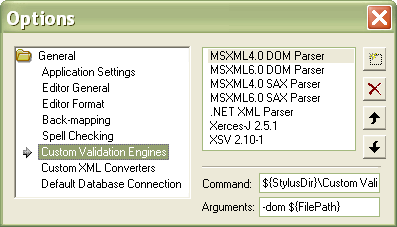 supports DTD based XML document validation using MSXML 4.0 DOM, MSXML 4.0 SAX, Microsoft .NET XML Parser, and Xerces-J." width="397" height="227"/>
<%=ConfigurationManager.AppSettings["SS"]%>'s Open XML Parsing and XML Validation Architecture is a requirement for real-world XML development, honoring the underlying XML theme of working toward true openness and interoperability.
Benefits of <%=ConfigurationManager.AppSettings["SS"]%>'s Open DTD Validation Architecture
<%=ConfigurationManager.AppSettings["SS"]%>'s Open DTD Parsing and XML Validation Architecture is a critical aspect of our award-winning XML IDE, one that can make the difference between a project's ultimate success or failure. Here's why:
- Avoid Abnormal Program Behavior: Every DTD processor and DTD validator has its own idiosyncrasies, either as a result of a software bug or due to lack of clarity in an XML standard's specification. Using different DTD parsers and validators in development and deployment environments systematically introduces an element of abnormal program behavior, creating a potential minefield of hidden bugs, each one difficult to track down and yielding potentially disastrous results.
- Enhance XML Developer Productivity: With <%=ConfigurationManager.AppSettings["SS"]%>, it's easy to check the results with either our built-in XML DTD parser and XML DTD Validator, or any other DTD processing component. This level of flexibility allows you to isolate potential problems in the development stage, thereby increasing your overall XML development productivity.
In summary, <%=ConfigurationManager.AppSettings["SS"]%>'s DTD open support for any DTD parser and validator ensures backward compatibility with older XML applications, and it provides helpful debugging and troubleshooting features when working with DTDs.