Translating EDIFACT documents to XML
<%= ConfigurationManager.AppSettings["SS"] %> has a built-in comprehensive dictionary of EDIFACT messages, segments, elements and codelists. It uses this EDIFACT respository for helping you write clean EDIFACT and diagnose problems with existing EDIFACT data streams.
This page will cover these topics relating to using the EDIFACT XML Converter:
- The EDIFACT URL
- The File|Open dialog and EDIFACT documents
- Open the EDIFACT document in the XML editor
- Using EDIFACT as input to XQuery
- Using EDIFACT as input to XSLT
(Note that the EDIFACT converter and the X12 converter use the same URL; the EDI converter engine figures out from the document itself whether it should switch to EDIFACT or X12 mode. Pretty cool, huh?)
(If you think this is keen, neat, cool or groovy, see also the data conversion API for using this stuff from your own programs as through you had prepared them from scratch. For the rest of the recipe, see the XML Converters page.)
The EDIFACT URL
The "secret sauce" to using EDIFACT with all of the various XML Tools is that <%= ConfigurationManager.AppSettings["SS"] %> has an advanced URI Resolver that does on-the-fly conversions of documents from one syntax to another.
Anything that can be addressed by URL can be morphed in real time through one of these converters. EDIFACT is just one type; others include one for Comma-Separated Values and one to convert HTML into XML.
The way an EDI file is converted is by taking any place a regular XML URL would go,
and instead putting the URL to the EDIFACT file, and prepending it with the
special adapter: protocol.
For example, to treat
C:\edifact-sample.txt
as an EDIFACT file, you'd use the URL
file:///c:/edifact-sample.txt.
But to use it as an XML file, you'd add to the beginning,
to get
adapter:EDI?file:///c:/edifact-sample.txt.
There can be other options before the
?
that change the behavior of the converter, but
the above is good enough to actually read and use EDIFACT documents as XML.
The File|Open dialog and EDIFACT documents
To create the URL, it can be done manually or through the Open|File dialog.
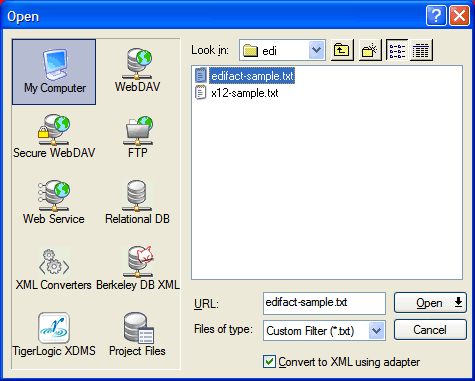
Since just opening the file naturally exposes the URL, let's see how simple it is to convert EDIFACT to XML.
First, use the same File|Open dialog you are used to in other applications to choose the file, except right before hitting Open, put a check in the special box labeled "Convert to XML using converter".
Open the EDIFACT document in the XML editor
Next we choose the proper converter, which in this case is the "Electronic Data Interchange (EDI)" converter.
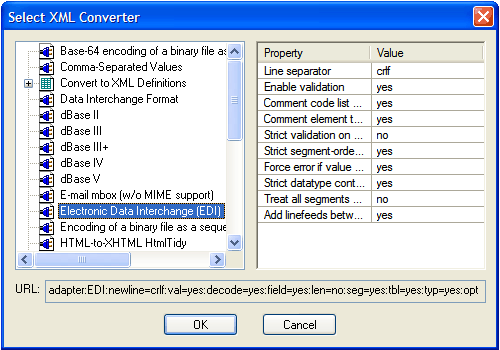
On the right side, there are several options that vary by converter. Changing them changes the URL prefix shown at the bottom of the dialog. Properly formed EDIFACT files will open without any changes, but occasionally you might need to suppress some of the automatic structural validation to get things to open.
| Some of the options Available for the EDIFACT Adapter | ||
|---|---|---|
| Description | Default Value | URL option |
| Line separator | crlf | newline= |
| Enable validation | yes | val= |
| Comment code list data | yes | decode= |
| Comment element types | yes | field= |
| Strict validation on value lengths | no | len= |
| Strict segment-ordering checking | yes | seg= |
| Force error if value not in code list | yes | tbl= |
| Strict datatype content checking | yes | typ= |
| Treat all segments as optional | no | opt= |
| Add linefeeds between segments on write | yes | eol= |
So, after picking the filename, checking one checkbox, pressing one button (Open), choosing the converter and pressing another button (OK), we've got a converted file in our XML editor.
Using EDIFACT as input to XQuery
To use this file as input to XQuery for example, we could use this same File|Open step to fill the "Main input:" field in the XQuery Scenario dialog:
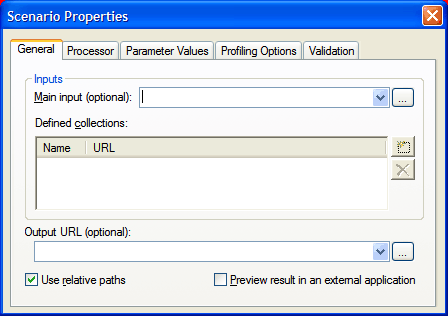
Then run an XQuery program consisting of solely a single period, and you should get as output the entire EDIFACT file but in XML form.
Using EDIFACT as input to XSLT
Using XSLT, go to the "Source XML URL:" field in the XSLT Scenario dialog:
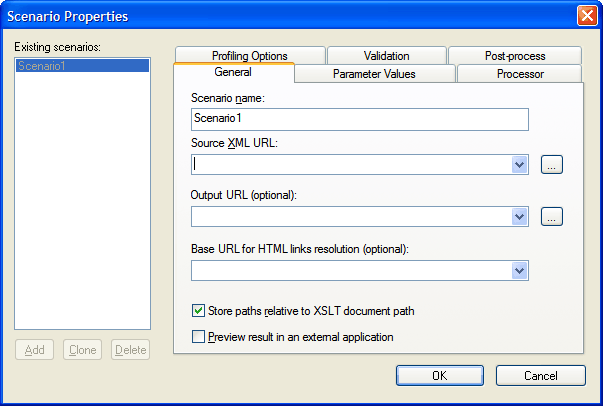
and try the following only slightly more sophisticated XSLT transform:
<xsl:stylesheet version="1.0" xmlns:xsl="http://www.w3.org/1999/XSL/Transform">
<xsl:template match="/">
<xsl:copy-of select="node()"/>
</xsl:template>
</xsl:stylesheet>
From this you see that it is trivial to use EDIFACT anywhere you are accustomed to using XML. Happy transforming!