Translating XML documents to EDIFACT
Once an XML document is created that contains the proper content to fill an EDIFACT structure, the adapter will do the syntactical translating for you. But how do you get the XML data to look right?
Using the same steps as in Converting EDIFACT to XML, we're going to load an EDIFACT document into the editor, change it, and save it back out — and we'll watch the change occur. This will demonstrate an XML document turning back into EDIFACT.
Then we'll see how we can do this automatically as part of an XSLT transformation.
Here are the steps for this demonstration:
- Open the EDIFACT document in the XML editor
- Change XML EDIFACT
- Save XML document in EDIFACT format
- See changed EDIFACT
- Use EDIFACT document as output of XSLT
Open the EDIFACT document in the XML editor
Perform the following steps:
- File|Open
- Choose your file — for example edifact-sample.txt
- Put a check in the "Convert to XML using adapter" checkbox
- Click the Open button
- Choose the "Electronic Data Interchange (EDI)" Adapter
- Click the OK button
Change XML EDIFACT
Let's change the recipient from DATADIRECT to SAXONICA.
Before:
<UNB03>

  <UNB0301><!--0010: Interchange recipient identification-->DATADIRECT</UNB0301>

  <UNB0302><!--0007: Identification code qualifier-->1<!--DUNS (Data Universal Numbering System)--></UNB0302>

</UNB03>
After:
<UNB03>

  <UNB0301><!--0010: Interchange recipient identification-->SAXONICA</UNB0301>

  <UNB0302><!--0007: Identification code qualifier-->1<!--DUNS (Data Universal Numbering System)--></UNB0302>

</UNB03>
Save XML document in EDIFACT format
Do File|Save As and choose a new filename; make sure that the
"Convert from XML using adapter" checkbox is checked and keep the same EDI
adapter chosen.
See changed EDIFACT
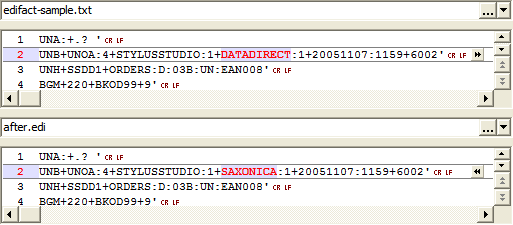
Comparing the two files shows that you just changed an EDIFACT document without an EDIFACT editor, or even seeing the EDIFACT file itself!
Use EDIFACT document as output of XSLT
We could automate this, and take the input document, change it with XSLT or XQuery, and save it as a new EDIFACT document with our change. Here are the steps:
- Use the XSLT code
edifact-change.xslbelow - Set your input document to be the edifact-sample.txt file, as passed through the EDI adapter
- Set your output document to be
after.edi, also passing through the EDI adapter - Run the stylesheet
<xsl:template match="/">
<xsl:apply-templates select="node()"/>
</xsl:template>
<xsl:template match="UNB0301">
<xsl:element name="{local-name(.)}">
<xsl:text>SAXONICA</xsl:text>
</xsl:element>
</xsl:template>
<xsl:template match="node()">
<xsl:choose>
<xsl:when test="local-name(.) = '#text'">
<xsl:value-of select="."/>
</xsl:when>
<xsl:when test="local-name(.) = '#comment'"/>
<xsl:otherwise>
<xsl:element name="{local-name(.)}">
<xsl:apply-templates select="node()"/>
</xsl:element>
</xsl:otherwise>
</xsl:choose>
</xsl:template>
</xsl:stylesheet>
What this does is the same thing we just did, but mechanically. It finds the UNB0301 segment and replaces whatever content text was there with the string SAXONICA. It also filters out any comments (but we could pass them along by replacing the line
<xsl:comment>
<xsl:value-of select="."/>
</xsl:comment>
</xsl:when>
The EDIFACT can be generated completely from XSLTor XQuery, and schemas can be generated against which to map and validate your EDIFACT XML.
The adapters can be used in other contexts as well. They may be built right in to your own applications, using either the data conversion API or as part of your file handling or XSLT/XQuery processing through the deployment adapters.