Convert EDIFACT to XML Schema
<%= ConfigurationManager.AppSettings["SSXE"] %> now includes a powerful EDIFACT to XML Schema conversion wizard for migrating or integrating legacy systems to support new XML, XML Schema and Web services technologies. It's just one of the many EDIFACT tools included in Stylus Studio Enterprise Edition for working with XML and UN/EDIFACT data.
Simplify EDIFACT Data Integration
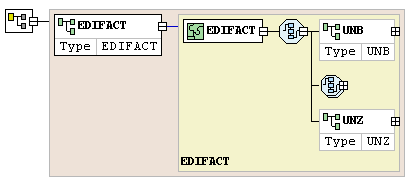
In this tutorial, we'll cover how to convert EDIFACT to XML Schema, automatically generating an XML schema data model from any EDIFACT message model. These powerful new EDIFACT tools are fully integrated with <%=ConfigurationManager.AppSettings["SS"]%>'s XML Schema Editor, which means that you can make further refinements or customizations using a powerful, visual editing interface, or generate a sample XML instance document, etc. An XML Schema representation of an EDIFACT data model is illustrated here:
Invoking the EDIFACT to XML Schema Wizard
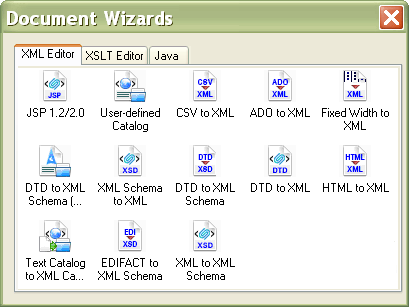
To convert an EDIFACT data model to XML Schema, select "File" > "Document Wizards" and invoke the EDIFACT to XML Schema Wizard from the Document Wizard Window (bottom row, second icon), as shown here:
Configuring the EDI to XML Schema Conversion
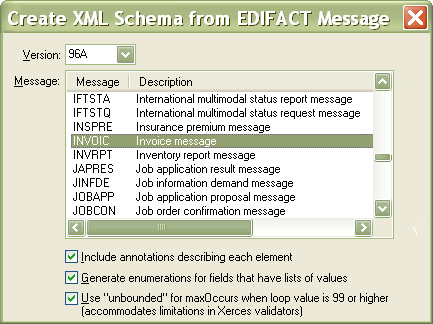
Next, choose the EDIFACT version and message that you want to convert. <%= ConfigurationManager.AppSettings["SSVXE"] %> provides various configuration options, including the ability to include XML schema documentation annotations, generate enumerations for fields that have lists of values, and using "unbounded" for maxOccurs when a loop value is greater then 99. In this example, choose EDIFACT Version 96A, and the Invoice message, then click OK, as illustrated here:
Save the XML Schema file we've built as INVOICE.xsd. The schema that is generated supports multiple copies of the message per transmission, and using the schema editing
tools available, schemas can be built even for transmissions which contain multiple types of messages.
To make navigating the schema simpler, we've kindly annotated the schema document with the various element, component and enumeration value names, so you're not stuck trying to guess what element 1001 means or what the enumerated values all represent in the real world.
Validating EDIFACT Files
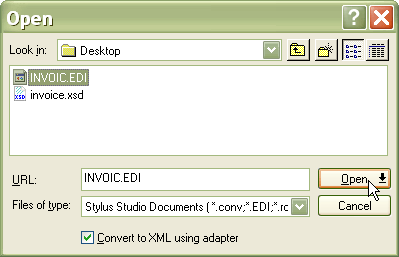
To validate existing EDIFACT files to make sure they match the schema, you can use the adapter technology already built in. You can download an example EDIFACT file to validate from here. (.ZIP, 77 Kb) Open the example EDIFACT file as shown below. Ensure that "Convert to XML Using Adapter" is selected, since the EDI file is not an XML file.
Next, Select the built-in Electronic Data Interchange (EDI) XML Converter option, keep the default conversion options, then click OK - <%=ConfigurationManager.AppSettings["SS"]%> performs the EDI-to-XML conversion.
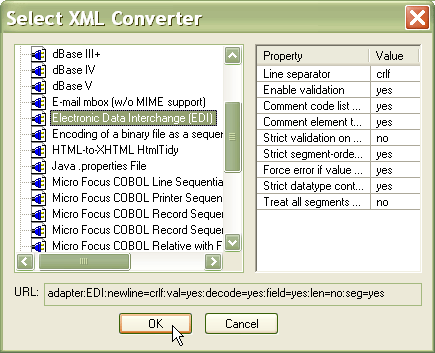
Now you're ready to validate the EDI data against the XML Schema that was generated earlier.
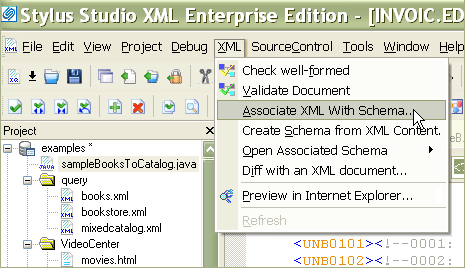
To do this, associate the converted EDI data to the INVOICE.xsd XML schema that
was previously generated. You can do this by selecting "XML" -> "Associate with XML Schema"
from inside <%=ConfigurationManager.AppSettings["SS"]%>, as illustrated here:
XML validation is important to ensure that your data is both syntactically well-formed and semantically accurate. Now that you have associated the XML Schema with the converted EDIFACT data, validation is easy. Click on the green checkmark icon in the XML Editor, choose a validating XML Schema processor, for example, MSXML 3.0, MSXML 4.0, MSXML 6.0, Xerces, XSV, Microsoft System.XML, etc. <%=ConfigurationManager.AppSettings["SS"]%> validates the data and reports the status to the Output Window.
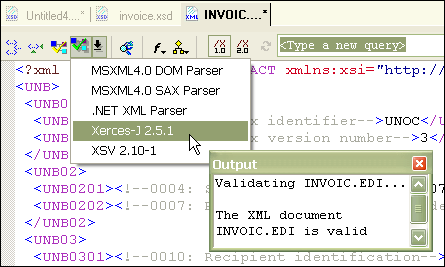
Voilą! We have all of the tools we need to not only generate XML from EDIFACT, but also to validate it. We can also take that same XML file and write it through the adapter, and turn it back into a well-formed EDIFACT document. This is especially useful with the advanced XML mapping functionality which can generate XSLT and XQuery to map either XML, EDI or many other formats to and from each other.
If you're working with EDIFACT and XML, save yourself hours of tedious work by downloading the most productive tool for XML and EDIFACT today!