ETL - Extract, Transform, Load
ETL Defined (or "What Is ETL?")
Extract-Transform-Load (ETL), is a process that is used to take information from one or more sources, normalize it in some way to some convenient schema, and then insert it into some other repository.
A common use is for data warehousing, where regular updates from one or more systems are merged and refined so that analysis can be done using more specialized tools. Typically the same process is run over and over, as new data appears in the source application(s). Other areas include:
- Data quality
- CRM (Customer Relationship Management)
- BI (Business Intelligence) (see also EII)
- Data migration
- Application integration (see also EAI)
An ETL Use-Case and Demonstration
In order to demonstrate this, we'll use a use-case that is similar in concept. In our ETL development example, the human resources department uses a recruiting tool written using a dBase- or FoxPro-like data structure. But the employee data is stored in Microsoft SQL Server.
For reference, here is the
new_empl.dbf
and using an
XSLT transform that reads a table and displays it as HTML,
we see this:
| new_empl.dbf | |||||||||
|---|---|---|---|---|---|---|---|---|---|
| NAME | STREET | CITY | STATE | ZIP | DEAR WHO | TEL HOME | BIRTH DATE | HIRE DATE | INSIDE |
| Guiles, Makenzie | 145 Meadowview Road | South Hadley | MA | 01075 | Macy | (413)555-6225 | 19770201 | 20060703 | yes |
| Forbes, Andrew | 12 Yarmouth Drive | Holyoke | MA | 01040 | Andy | (413)555-8863 | 19600330 | 20060710 | yes |
| Barra, Alexander | 4327 Spring Drive | Sandwich | MA | 02537 | Al | (508)555-8974 | 19861221 | 20060717 | no |
| Mellon, Philip | 123 Pendexter Street | Boston | MA | 01321 | Phil | (781)555-4289 | 19700625 | 20060724 | no |
| Clark, Pamela | 44 Mayberry Circle | Bedford | MA | 01730 | Pam | (860)555-6447 | 19500502 | 20060731 | yes |
Our steps will be then, to Extract, Transform, and Load.
- The extract step will take the data from the dBASE III file and convert it into a more usable format - XML
- The transform step will change the date format into standard ISO dates, split the name into first and last names, and assign the appropriate manager based on whether the employee is being assigned to inside sales or the external sales force.
- The load step will take the resulting file and send it to SQL Server.
- As a side-effect, it would be nice to get a report of data loaded.
Extracting Data from the Legacy Application
Using the
XML Converters,
extracting the data into something usable is very simple.
Doing just File|Open, selecting the new_empl.dbf file,
and choosing the dBase III converter will transform the data into XML.
The URL that is used shows that anywhere XML is used, we can use
also use any data source that we have an converter for. Our URL in
this case is:
adapter:dBase_III?file:///c:/etl/new_empl.dbf
Adding the adapter: prefix enables the converter engine.
The dBase_III portion choose the converter; there are many converters available including some
very sophisticated ones such as
EDI which automatically handles
EDIFACT,
X12,
HL7,
IATA,
EANCOM and other EDI dialects.
The file:///c:/etl/new_empl.dbf is just the location of the file we want to use as input.
The result of this extraction will be an XML file similar to this:
<?xml version="1.0" encoding="UTF-8"?>
<table date="20060731" rows="5">
<row row="1">
<NAME>Guiles, Makenzie</NAME>
<STREET>145 Meadowview Road</STREET>
<CITY>South Hadley</CITY>
<STATE>MA</STATE>
<ZIP>01075</ZIP>
<DEAR_WHO>Macy</DEAR_WHO>
<TEL_HOME>(413)555-6225</TEL_HOME>
<BIRTH_DATE>19770201</BIRTH_DATE>
<HIRE_DATE>20060703</HIRE_DATE>
<INSIDE>yes</INSIDE>
</row>
...
</table>
While we are at it, let's find out what our target schema is. To do this, we use the DB to XML Data Source module. We're using the standard demonstration database that comes with SQL Server, called Northwind.
To build our map, we'll use SQL/XML, which gives us any arbitrary subset of the available data. Just the defaults are fine for this demonstration. The steps are:
- File|New|DB to XML Data Source
- Choose Microsoft SQL Server as the database type
- Choose your server, if not
localhost - Give your username and password
Now, you should see the schema of your database. Open the Northwind database and drag the Employees table onto the canvas, and choose "SELECT (SQL/XML)..." from the menu. Since we're also going to use this later to insert data into the database, switch to the UPDATE tab, and drag Employees again, but this time choose "INSERT...".
Now, save this as etl-target.rdbxml.
(For more details on SQL/XML, see the SQL/XML Tutorial.
Transforming Data into the Target Form
We're going to use a series of XSLT transforms to modify this. (We could do it in one large XSLT file, we're breaking it into steps for demonstration purposes. In a production ETL operation, likely each step would be more complicated, and/or would use different technologies or methods.)
- Convert the dates from CCYYMMDD into CCYY-MM-DD (the "ISO 8601" format) [
etl-code-1.xsl] - Split the first and last names [
etl-code-2.xsl] - Assign the manager based on inside or external sales [
etl-code-3.xsl] - Map the data to the new schema [
etl-code-4.xsl]
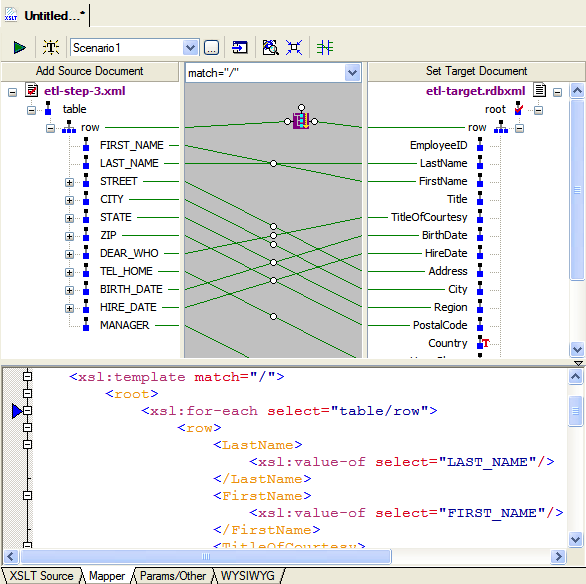
For the last step above, we can use the XSLT mapper to generate the code for us.
We use the output from the third step on the left, and the
etl-target.rdbxml
we saved earlier on the right, and draw lines
connecting the corresponding fields.
Loading Our ETL Results into the Data Repository
At this point, loading is a just matter of writing the output of the last XSLT
transform step into the etl-target.rdbxml
map we built earlier. But rather than run all of those steps one-by-one, we should
use the XML Pipeline to automate the task.
How to Assemble the Individual ETL Steps into a Pipeline
- File|New|XML Pipeline
- Drag the four XSLT files from the File Explorer to the canvas
- Connect the output triangle from each to the input circle of the next
- Click on the output triangle of the last step, and set the "Copy to URL" property to our
etl-target.rdbxml
And now we can execute our XML pipeline in the simulator it by doing XMLPipeline|Execute.
Generating ETL Java Code
Creating the core of a service is as simple as pressing the  button. Answer a couple of questions,
and code is created. Following the instructions in the generated code will let you run it. Since
<%= ConfigurationManager.AppSettings["SS"] %> contains an integrated Java IDE,
you can run it right from there. Here's what a portion of the code might look like for the standard Java deployer:
button. Answer a couple of questions,
and code is created. Following the instructions in the generated code will let you run it. Since
<%= ConfigurationManager.AppSettings["SS"] %> contains an integrated Java IDE,
you can run it right from there. Here's what a portion of the code might look like for the standard Java deployer:
public boolean init() throws Exception {
// Create all the objects required for the pipeline
convertToXML = new ConvertToXML("Convert to XML", getEnvironment());
convertToXML.setAdapter("adapter:dBase_III");
fixDates = new SaxonXSLTOperation("Fix Dates", ContentType.UNKNOWN, getEnvironment());
nameSplit = new SaxonXSLTOperation("Name Split", ContentType.UNKNOWN, getEnvironment());
inside_OutsideSales = new SaxonXSLTOperation("Inside/Outside Sales", ContentType.UNKNOWN, getEnvironment());
mapSchema = new SaxonXSLTOperation("Map Schema", ContentType.XML, getEnvironment());
reportOnOutput = new SaxonXSLTOperation("Report on output", ContentType.XML, getEnvironment());
edge_2 = new EdgeImpl("edge_2", getEnvironment(), DataType.NODE, DataType.DOCUMENT);
edge_3 = new EdgeImpl("edge_3", getEnvironment(), DataType.ANY, DataType.DOCUMENT);
edge_4 = new EdgeImpl("edge_4", getEnvironment(), DataType.ANY, DataType.DOCUMENT);
edge_5 = new EdgeImpl("edge_5", getEnvironment(), DataType.ANY, DataType.DOCUMENT);
edge_6 = new EdgeImpl("edge_6", getEnvironment(), DataType.NODE, DataType.DOCUMENT);
// Connect all the operation objects with edge objects.
convertToXML.setInputUrl("new_empl.dbf", DataType.NONE);
convertToXML.addOutputEdge(edge_2);
fixDates.setScriptUrl("etl-step-1.xsl");
fixDates.addInputEdge(edge_2);
fixDates.addOutputEdge(edge_3);
nameSplit.setScriptUrl("etl-step-2.xsl");
nameSplit.addInputEdge(edge_3);
nameSplit.addOutputEdge(edge_4);
inside_OutsideSales.setScriptUrl("etl-step-3.xsl");
inside_OutsideSales.addInputEdge(edge_4);
inside_OutsideSales.addOutputEdge(edge_5);
mapSchema.setScriptUrl("etl-step-4.xsl");
mapSchema.addInputEdge(edge_5);
mapSchema.addOutputEdge(edge_6);
mapSchema.setOutputUrl("db:///c:/etl/etl-target.rdbxml", DataType.NODE);
reportOnOutput.setScriptUrl("generic_table_dumper.xsl");
reportOnOutput.addInputEdge(edge_6);
reportOnOutput.setOutputUrl("etl-log.html", DataType.NODE);
return true;
}
Showing the ETL Log
But we might want to see what's happening, so after that, we just have to drag
and drop over our pal generic_table_dumper.xsl
from earlier, and draw a line from the output of our last step to the start of this.
We'll also set the output of this to be etl-log.html.
Now when we run it, we'll get the input data refined, written to the database, and have as output a log of the results that should look something like this when you open the .html file:
| new_empl.dbf | ||||||||||||||||
|---|---|---|---|---|---|---|---|---|---|---|---|---|---|---|---|---|
| Emplo yeeID | Last Name | First Name | Title | TitleOf Courtesy | BirthDate | HireDate | Address | City | Reg ion | Postal Code | Coun try | HomePhone | Exten sion | Notes | Repo rtsTo | Photo Path |
| 10 | Guiles | Makenzie | Macy | 1977-02-01 00:00:00.0 | 2006-07-03 00:00:00.0 | 145 Meadowview Road | South Hadley | MA | 01075 | USA | (413)555-6225 | 8 | ||||
| 11 | Forbes | Andrew | Andy | 1960-03-30 00:00:00.0 | 2006-07-10 00:00:00.0 | 12 Yarmouth Drive | Holyoke | MA | 01040 | USA | (413)555-8863 | 8 | ||||
| 12 | Barra | Alexander | Al | 1986-12-21 00:00:00.0 | 2006-07-17 00:00:00.0 | 4327 Spring Drive | Sandwich | MA | 02537 | USA | (508)555-8974 | 5 | ||||
| 13 | Mellon | Philip | Phil | 1970-06-25 00:00:00.0 | 2006-07-24 00:00:00.0 | 123 Pendexter Street | Boston | MA | 01321 | USA | (781)555-4289 | 5 | ||||
| 14 | Clark | Pamela | Pam | 1950-05-02 00:00:00.0 | 2006-07-31 00:00:00.0 | 44 Mayberry Circle | Bedford | MA | 01730 | USA | (860)555-6447 | 8 | ||||
(Titles split to make the display fit better)
Our ETL Service
At this point, what we've done is build a service that can handle extracting information from one source, transforming it in a series of operations, and loading it into another source. We've then gone on and built a logging system, and even packaged up the whole set of steps as a single pipeline and generated the code to support it.
This is only the beginning. Other steps could involve conditional processing, validation of intermediate and/or final results, error handling, and conversion to other file formats. Entire pipelines can be included as modules inside of other pipelines, and parameters can be passed in to XSLT and XQuery.
See the other demonstrations for more examples on the power of XML Pipelines.