Learn Flat File Data Conversion: Convert to XML Video Demonstration
The Stylus Studio Convert to XML module makes it possible to quickly and easily convert .txt, binary, and EDI files to XML documents. You can use Convert to XML to convert a single document,
or to build reusable converters that let you open flat files as XML documents anywhere in Stylus Studio.
We've created two videos that demonstrate the power of Convert to XML —
Introduction to Convert to XML covers the basics and
EDI to XML Mapping with Stylus Studio walks you through a more advanced EDI to XML mapping.
Round Trip Engineering: Getting EDI to XML and Back Again
covers how to set up bi-directional data mapping using Stylus Studio URL adapters.
These video demonstrations showcase just how easy it is to tap into the data stored in your enterprise's flat files and legacy data as XML.
Please note that Convert to XML is only available in Stylus Studio XML Enterprise Edition.
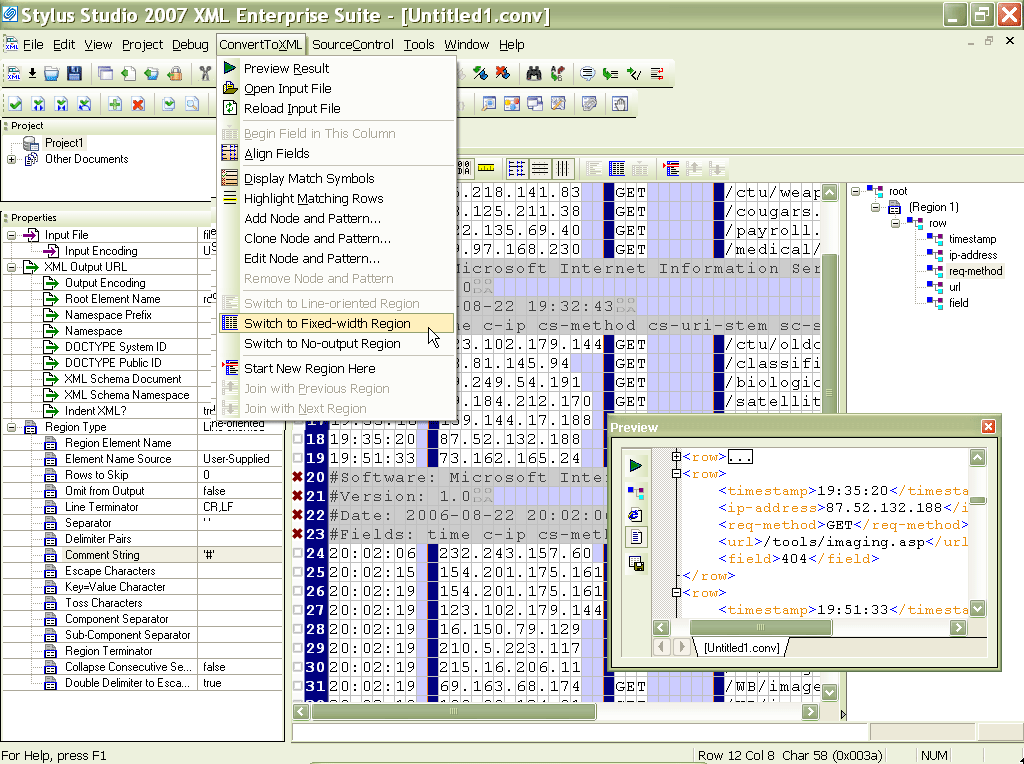
Introduction to Convert to XML covers:
- How to open a single file and preview default conversion results
- Display features of the Convert to XML Editor
- Specifying settings to filter the source text, binary, and EDI files you plan to convert to XML
- Defining regions within files that allow you to exercise more granular control over the XML generated by <%=ConfigurationManager.AppSettings["SS"]%>
- Manual and automatic settings for specifying
root,region, andfieldelement names - How to save a converter and how to use it to open a flat file as an XML document
EDI to XML Mapping in <%=ConfigurationManager.AppSettings["SS"]%> Covers:
- Visually inspecting application control codes and the layout of an Electronic Data Interchange (EDI) type 831 x12 file.
- Automatically specifying segment terminating characters.
- Loading an EDI file in Convert-to-XML.
- Using default EDI-to-XML settings and previewing the data conversion.
- Visually inspecting the resulting XML-ified EDI records.
- Overriding default names used by the WS-EDI standard to create custom XML element and attribute names.
- Using <%=ConfigurationManager.AppSettings["SS"]%>'s 'set node and match pattern' feature to tailor the XML output to reflect content in each differently structured row in the EDI file.
- Using regular expressions to create more sophisticated matching patterns, to include exclude rows from the XML output.
- Using the <%=ConfigurationManager.AppSettings["SS"]%>'s 'Lookup List' feature to specify translation values to substitute cryptic error codes to more meaningful names.
- Working with X12, HL7, UN EDIFACT and other EDI formats.
Bi-Directional EDI to XML Mapping using Stylus Studio URL Adapters
- How to use Stylus Studio's Adapter URL technologies to convert EDI to XML and back again.
- Converting an EDI data model to XML Schema with the EDIFACT to XML Schema wizard.
- Overview of the built-in XML Converters for working with hundreds of different EDI formats.
- Customizing the way EDI segments are converted to XML in Stylus Studio.
- Converting the EDI 96A Message Type to an XML document.
- Using the Stylus Studio XSLT Mapper to get the converted XML into a more formal XML standard.
- Using the EDIFACT to XML Schema wizard to generate an XML Schema based on the EDI 96A Message Schema.
- Configuring the EDIFACT to XML Schema Wizard.
- Browsing a converted EDIFACT data model in the XML Schema Editor.
- Validating a converted EDI document against an XML Schema.
- Using Stylus Studio's adapter URL to write back changes made to the XML into its original EDI format (round-trip conversion).
- Customizing the display options in the XSLT mapper.