Learn XQuery Visually
We are pleased to provide three infomative XQuery demonstration videos illustrating <%=ConfigurationManager.AppSettings["SS"]%>'s XQuery Editor, Mapper, Debugger and other advanced functionality (shown below, click to enlarge). The first video, Introduction to the XQuery Mapper, provides an overview of how to connect to query and aggregate XML sources in a powerful, standards-compliant way. The second video, Advanced XQuery Mapper Features , covers in greater depth the use of <%=ConfigurationManager.AppSettings["SS"]%>'s advanced XQuery development tools to aggregate data from multiple XML sources for use in run time application. Finally, Using DataDirect XQuery with <%=ConfigurationManager.AppSettings["SS"]%>, covers an overview of <%=ConfigurationManager.AppSettings["SS"]%>'s support for DataDirect XQuery, a powerful Java XQuery component optimized for running XQuery against relational databases. Detailed descriptions are provided below.
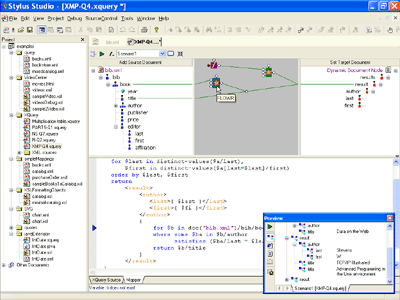
Introduction to the XQuery Mapper Covers:
- Selecting XML data sources for an XML mapping project, including web service data and XML data
- Specifying the use of dynamic, Web service data for use in an advanced XML mapping project, in addition to an XML document
- Specifying a target XML Schema output format, and modifying the target XML Schema on the fly
- Specifying XQuery or custom functions to aggregate or manipulate data
- Defining and using custom data processing functions
- Visually specifying relationships between XML source document(s) to a target XML Schema
- Joining different XML data sources using an XQuery expression
- Creating advanced associations between repeating XML data elements using XQuery FLWR (for, let where, and return) expressions.
- Using visual, data processing function blocks in <%=ConfigurationManager.AppSettings["SS"]%> to filter data based on conditions, or to specify looping
- Chaining together data processing function blocks, creating customized, advanced XML data transformation logic
- Previewing the output of an XQuery data mapping in <%=ConfigurationManager.AppSettings["SS"]%>'s XQuery output window
- Dynamically fetching web service data for use in XQuery transformation using the Web Service Call composer
- Understanding complex mapping relationships with Backmapping, which associates data in the Output Window with the line of XQuery code that generated that output.
- Understanding <%=ConfigurationManager.AppSettings["SS"]%>'s 2-way, synchronized XQuery editing and mapping which allows you to create any XQuery expression, either manually using <%=ConfigurationManager.AppSettings["SS"]%>'s XQuery editor
Advanced XQuery Mapper Features Covers (in greater detail):
- Opening existing, advanced XQuery source document(s)
- Specifying multiple XML source documents for use in an XML mapping project, including dynamic XML Web Service Data
- Specifying sophisticated source-target XML data mappings
- Defining a target XML schema from scratch, or by modifying an existing target schema on the fly
- Visually creating an advanced XQuery expression in the XQuery mapper
- Specifying operations, constants, and ports, for use in conditional blocks and FLWR expressions
- Working with elements and attributes with the drag-and-drop XQuery mapper
- Understanding <%=ConfigurationManager.AppSettings["SS"]%> XQuery mapping diagrams
- Executing advanced XQuery expressions and verifying the results
Using DataDirect XQuery with <%=ConfigurationManager.AppSettings["SS"]%>
- Configuring the Java Runtime Environment in <%=ConfigurationManager.AppSettings["SS"]%>
- An overview of the XQuery Collection Function
- Creating an example XQuery that uses an XQuery collection that is bound to a relational database
- Connecting and Browsing a Relational Database and creating an access URL for that data source using the <%=ConfigurationManager.AppSettings["SS"]%> URL Builder
- Returning database results in a structured XML format using XML Forrest
- How to select the DDXQ processor in <%=ConfigurationManager.AppSettings["SS"]%>'s XQuery Scenario Properties window
- Editing an XQuery file in <%=ConfigurationManager.AppSettings["SS"]%> and using the XQuery code completion feature
- Running and saving an XQuery file in <%=ConfigurationManager.AppSettings["SS"]%>.
- Browsing the XML results retuned from the database through DDXQ
- Specifying default database-to-XML connection settings.