OASIS Catalog Support
XML Schema and DTD are the foundation of any well-formed XML document. <%= ConfigurationManager.AppSettings["SSVXE"] %>'s features for working with OASIS catalogs allow you to incorporate any vendor's catalog — or one of your own — in your XML, making writing correct and robust XML easier than ever.
Choose from Dozens of OASIS Standard Catalogs Installed with <%=ConfigurationManager.AppSettings["SSVXE"]%>
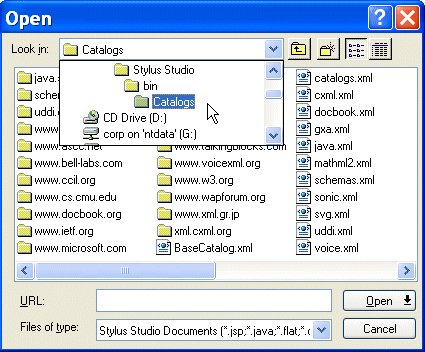
<%=ConfigurationManager.AppSettings["SSVXE"]%>'s multi-faceted OASIS Catalog support gives you out-of-the-box access to industry-standard XML schemas and DTDs from the W3C, Sun, Microsoft, and many others. Taking advantage of OASIS-standard catalogs, published by dozens of technology vendors and organizations, is as easy as selecting File > Open from the <%=ConfigurationManager.AppSettings["SSVXE"]%> menu, as shown in the following illustration. With point-and-click ease, you can access schemas for XHTML, WML, CML, DocBook, and dozens of (complimentary and competing) Web services standards.
Catalog Wizards
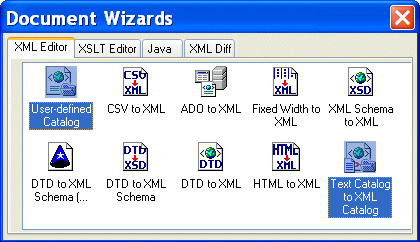
Want to roll your own? <%= ConfigurationManager.AppSettings["SSVXE"] %> has two Catalog Wizards. These Wizards, shown in the following illustration, allow you to create a user-defined catalog, or to convert a catalog in text format to XML.
User-Defined Catalog Wizard
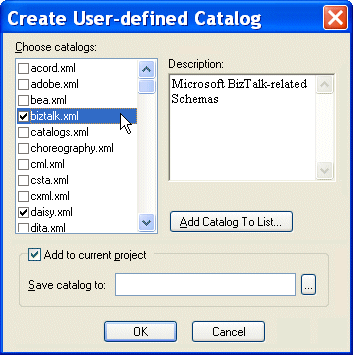
The <%= ConfigurationManager.AppSettings["SSVXE"] %> User-Defined Catalog Wizard, shown in the following illustration, lets you create your own catalog from one or more existing catalog sources.
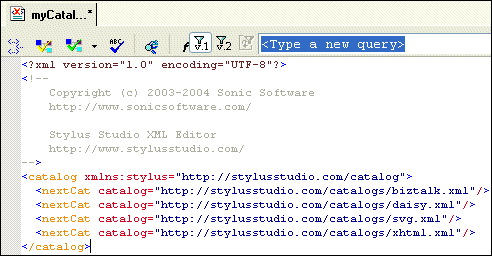
The catalogs you build, like the one shown in the following illustration, can optionally be added to the current project at the time you create them.
If you have existing text-mode catalogs in the SGML or TR 9401 (SOCAT) syntax, they can be used without conversion to XML — <%=ConfigurationManager.AppSettings["SSVXE"]%>, on-the-fly, performs an in-memory conversion of those catalog formats. <%=ConfigurationManager.AppSettings["SSVXE"]%> also transparently supports several older variants of catalogs, such as the XMLCatalog and XCatalog formats.
Add Catalogs to Your <%=ConfigurationManager.AppSettings["SSVXE"]%> Projects
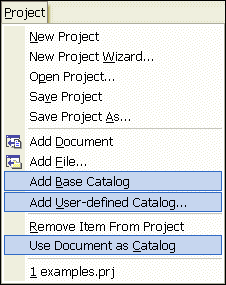
<%= ConfigurationManager.AppSettings["SSVXE"] %> has complete support for catalogs at the Project level — as shown in the following illustration, you can easily add the <%= ConfigurationManager.AppSettings["SSVXE"] %> Base Catalog or any User-defined catalog to your projects. And support isn't limited to a single catalog per project, as it is with some editors. With <%= ConfigurationManager.AppSettings["SSVXE"] %>, you can include as many catalogs as you need. And you can define any XML document as a catalog in the context of a given Project.
<%= ConfigurationManager.AppSettings["SSVXE"] %>'s integrated support for OASIS-standard catalogs lets you easily leverage XML Schemas and DTDs from dozens of industry vendors; or you can create your own catalog using either of two Catalog Wizards.