Support for Web Service Servers and Web Service Clients
Web services offer unprecedented interoperability across different operating systems, programming languages, protocols, software components, databases and server technologies, unifying disparate technologies in a standards-based way. In keeping with the underlying principle of interoperability, all of <%=ConfigurationManager.AppSettings["SS"]%>'s Web service development tools, including the Web Service Call Composer (i.e. the Web service tester) can be used in conjunction with all of the major Web service clients and Web service servers, including:
- Apache AXIS
- Microsoft SOAP Client Toolkit 3.0
- Microsoft .NET Server
Create and Save Web Service Scenario Properties
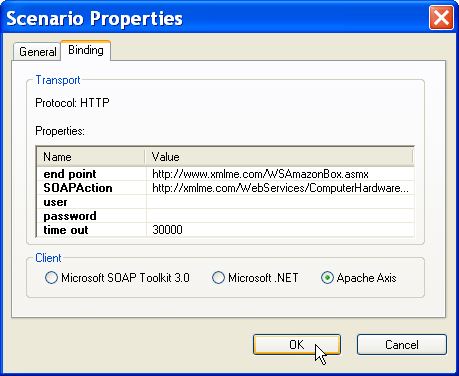
A Web service Scenario is an association of settings used to invoke a Web service operation, for example, your SOAP client, end point, SOAPAction, username, password, timeout, etc. <%=ConfigurationManager.AppSettings["SS"]%> allows you to name and save different Web service scenario properties (i.e. Web service call properties) as shown here:
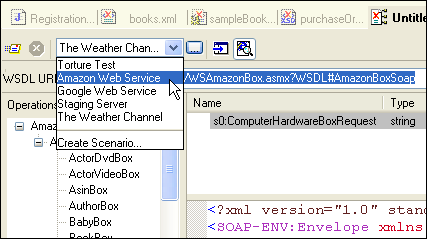
Once you've created different scenarios to emulate your various Web service test cases, you can easily switch between them from a combo-box located on the Web service toolbar as shown here:
Comprehensive support for all Web service clients and Web service servers, as well as the ability to create and save Web service Scenario Properties further makes <%=ConfigurationManager.AppSettings["SS"]%> the ultimate Web Services IDE.
Next Web service development feature: Support for building Web Services using industry standard Web service XML Schemas