XQuery Tools for TigerLogic® XDMS
<%= ConfigurationManager.AppSettings["SSVXE"] %> now includes integrated developer tools support for Raining Data® TigerLogic XDMS, a high-performance XML data management server that provides flexible, scalable, and extensible storage and retrieval of critical business data across a variety of structured and unstructured information sources.
Evaluate XQuery Using TigerLogic XDMS
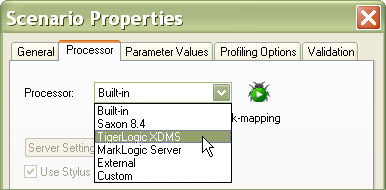
<%= ConfigurationManager.AppSettings["SSVXE"] %> provides an integration with the TigerLogic XDMS XQuery processor, allowing you to execute advanced XQuery expressions directly against any TigerLogic XDMS instance. To get started, choose the TigerLogic XDMS option from the XQuery Processor tab in the XQuery Scenario Properties window, as illustrated below. Now when you run XQuery expressions in <%=ConfigurationManager.AppSettings["SS"]%> by clicking the "Preview Result" button, <%=ConfigurationManager.AppSettings["SS"]%> transparently sends the XQuery to the TigerLogic server and displays the returned result in the XQuery output Preview window. The integration is seamless, and all of the <%=ConfigurationManager.AppSettings["SS"]%>'s helpful XQuery editing features like Sense:X XQuery code completion, the XQuery Source and Mapper tabs for building XQuery code, XQuery scenarios, and more, are all fully supported and TigerLogic XDMS syntax-aware.
Accessing the TigerLogic XDMS Server
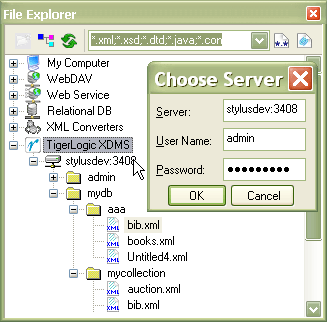
<%= ConfigurationManager.AppSettings["SSVXE"] %> provides complete file system access to the collections in any TigerLogic database as though it were a resource on the local file system. To access a TigerLogic database, you must provide the server's URL and login credentials. Once authenticated, you can browse, create, edit, and delete documents stored in TigerLogic XDMS collections directly from the <%=ConfigurationManager.AppSettings["SS"]%> File Explorer, as illustrated below. Additionally, files in TigerLogic XDMS collections can be accessed as <%=ConfigurationManager.AppSettings["SS"]%> data source, meaning that you can seamlessly access the underlying XML data from within any of <%=ConfigurationManager.AppSettings["SS"]%>'s XML tools, for example, creating an XQuery mapping project that maps data directly from documents stored on the TigerLogic XDMS server.
Support for TigerLogic XQuery Web Service Extensions
TigerLogic XDMS provides the unique ability to run Web service calls directly in-line from within an XQuery expression using Tigerlogic XDMS extensions. Here's a simple example of calling a stock quote Web service using TigerLogic XDMS XQuery. You can download the source code which includes documentation, but in a nutshell, here are the steps:
- Import a WSDL File, like the Swan and Mokashi stock quote Web service:
import service namespace stock = 'http://www.swanandmokashi.com/HomePage/
WebServices/StockQuotes.asmx?WSDL#StockQuotesSoap' - Declare a Web Service Operation. This method retrieves stock quote information:
operation GetStockQuotes port StockQuotesHttpGet; - Declare a Local Namespace for the WSDL resource:
declare namespace sw = 'http://swanandmokashi.com';
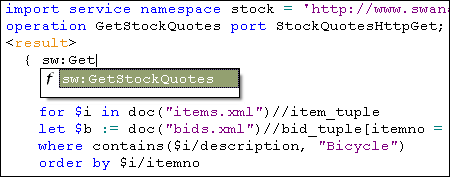
<%=ConfigurationManager.AppSettings["SS"]%> supports XQuery and Web service development with TigerLogic XDMS through a powerful distributed code completion feature that introspects the WSDL file that you are using to provide syntax help and code completion based on the TigerLogic XDMS extensions, as illustrated here.
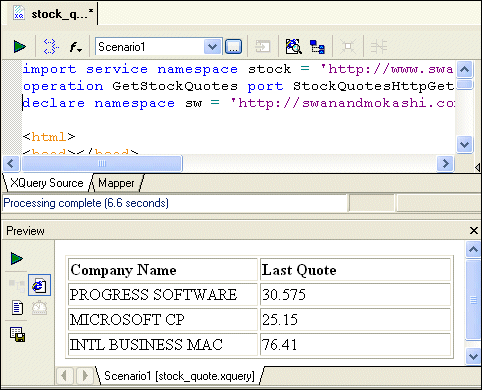
With <%=ConfigurationManager.AppSettings["SS"]%> you can seamlessly test and preview any XQuery expression that leverages the Tigerlogic XDMS XQuery and Web service extensions. Using TigerLogic XDMS extensions you can, for example, execute a Web service, then loop through the resulting XML data in XQuery to produce a report like the simple HTML report shown here:.
Authoring Support for TigerLogic XDMS XQuery Extensions
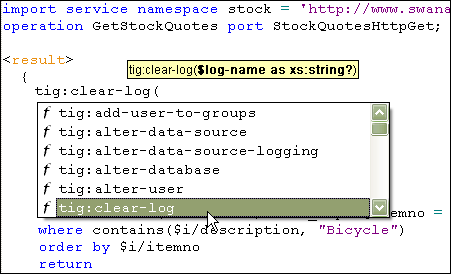
<%= ConfigurationManager.AppSettings["SSVXE"] %> fully supports all TigerLogic XDMS XQuery extension functions, in addition to supporting the XQuery and Web service extensions described previously. An example of the TigerLogic XDMS XQuery code completion and syntax help features is illustrated here:
<%= ConfigurationManager.AppSettings["SSVXE"] %> provides a powerful and productive way to develop, test, and deploy enterprise XQuery and Web service applications. Get started by downloading a free trial of <%=ConfigurationManager.AppSettings["SS"]%> today!