AWARD-WINNING XML DEVELOPMENT ENVIRONMENT FOR ADVANCED DATA INTEGRATION
A printable PDF version of the <%= ConfigurationManager.AppSettings["SSVXE"] %> Datasheet is available.
OVERVIEW
<%= ConfigurationManager.AppSettings["SSVXE"] %> raises the bar for productivity in XML development tools. Approximately 2 Million XML developers and data integration specialists turn to Stylus Studio's comprehensive and intuitive XML toolset to tackle today's advanced XML data transformation and aggregation challenges. And you should, too!
Winner of CRN Magazine's Product of the Year Award, Dr. Dobb's Jolt Productivity Award, and SOAWorld Readers' Choice Award for the technical excellence of its powerful yet easyto- use tools, Stylus Studio simplifies all XML development tasks. Whether you are developing Web applications that transform relational data to XML, leveraging legacy data in EDI, HL7, or other flat file formats like CSV, or wrestling with complex XSLT stylesheets, Stylus Studio helps you realize the promise of existing and emerging XML technologies. From XQuery to XML Pipelines to Java or C# for .NET code generation, Stylus Studio is the one XML IDE that does it all.
XML PIPELINE EDITOR, DEBUGGER, AND CODE GENERATOR
Stylus Studio leads the way in XML tools innovation with its XML Pipeline Editor. The XML Pipeline Editor lets you model your entire XML application in a single design, instead of as numerous disjoint pieces. Code-generation and cross-language debugging round out this intuitive tool.
- Drag-and-drop tools make it easy to quickly create nodes that represent individual stages in your XML processing application.
- Use existing XQuery, XSLT, and validation code to jump-start XML Pipeline development, or use the XML Pipeline Editor to design the application processes and flow.
- Use control structures to emit warnings, errors, or to stop XML Pipeline processing altogether.
- Complete debugging support allows you to establish breakpoints and step into individual processes – you can even debug across different languages in your XML Pipeline.
- Use DataDirect XML Converters to extend XML Pipeline processing to non-XML data such as relational, EDI, and flat-file formats.
- Generate Java or C# for .NET code to help you deploy your XML Pipeline.
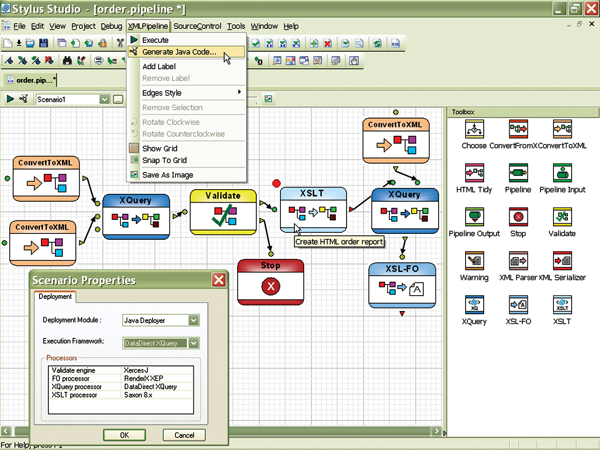
Stylus Studio's innovative XML Pipeline Editor makes it easy to visually specify the XML operations like file validation, document transformation, and database query using simple drag-and-drop. And when you're done, debug your XML Pipeline and generate code with a single click!
XML PUBLISHER
Stylus Studio's XML Publisher is a powerful XML report designer that allows you to create advanced document layouts for use in single-source publishing, XML content management, and multichannel publishing applications.
- Intuitive visual interface allows business users to easily design rich document layouts to publish XML content to PDF, HTML, Postscript and many other document formats.
- Generate XSLT 1.0, XSLT 2.0, or XQuery 1.0 code for HTML+CSS and XSL-FO.
- Supports numerous heterogeneous data sources including relational databases; XML databases; Web services; EDIFACT, X12, EANCOM, IATA and other flat file formats; as well as XML and XML Schema documents.
- Use XML Publisher for single-source publishing needs, using the same XML and non-XML content for Web and print output.
- Develop multi-channel applications to publish to multiple output formats from the same input at the same time!
- Comprehensive formatting tools let you quickly add tables, lists, and formatted text to XML Publisher reports.
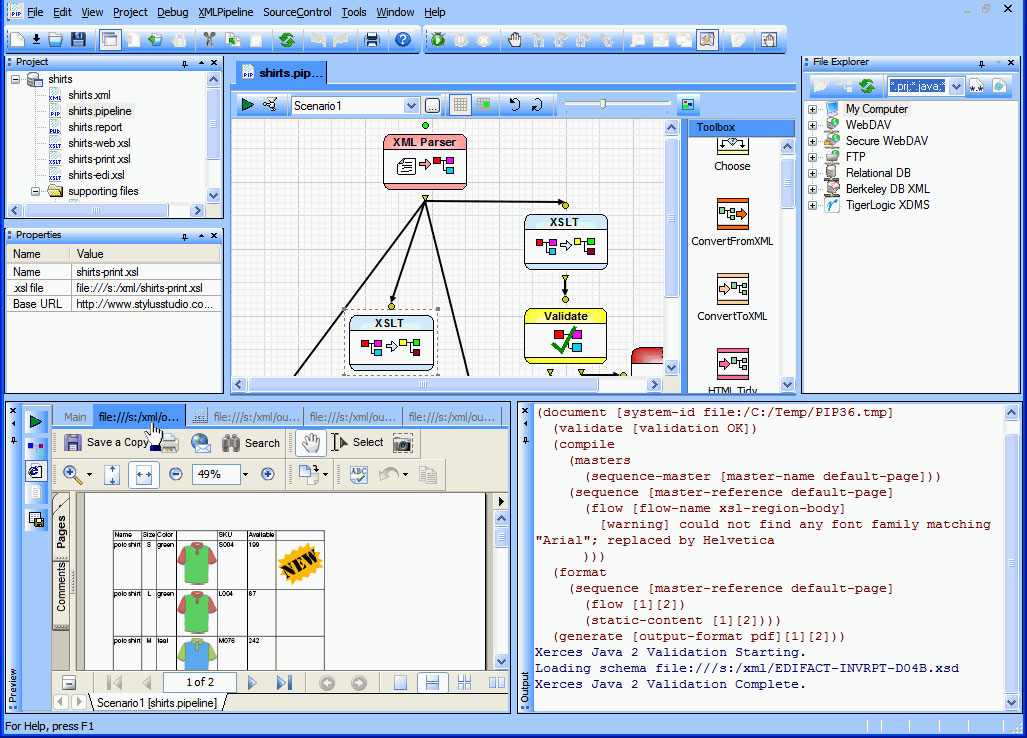
The XML Publisher lets you design XQuery and XSLT code graphically for HTML+CSS and XSL-FO.
DATADIRECT XML CONVERTERS
DataDirect XML Converters – high-performance Java and .NET components that provide bi-directional, programmatic access to virtually any non-XML file (EDI, flat files, etc.) – are bundled with each installation of Stylus Studio 2011 XML Enterprise Suite. XML Converters allow you to seamlessly stream any non-XML data as XML to industry-leading XML processing components or to your own applications.
- DataDirect XML Converters are available for both Java and .NET platforms.
- DataDirect XML Converters support StAX, SAX, DOM and I/O streaming interfaces.
- Embed XML Converters directly for translation purposes, or as use them as part of a chain of programs including XSLT and XQuery, or even inside XML pipelines.
- Support for EDIFACT, EANCOM, IATA, HL7 and X12 EDI dialects.
- XML Converters work with DataDirect XQuery® to provide seamless integration for your relational, XML, EDI, and other legacy formats.
- Use Stylus Studio to build custom XML conversions using an intuitive graphic interface – your own converters for proprietary file formats!
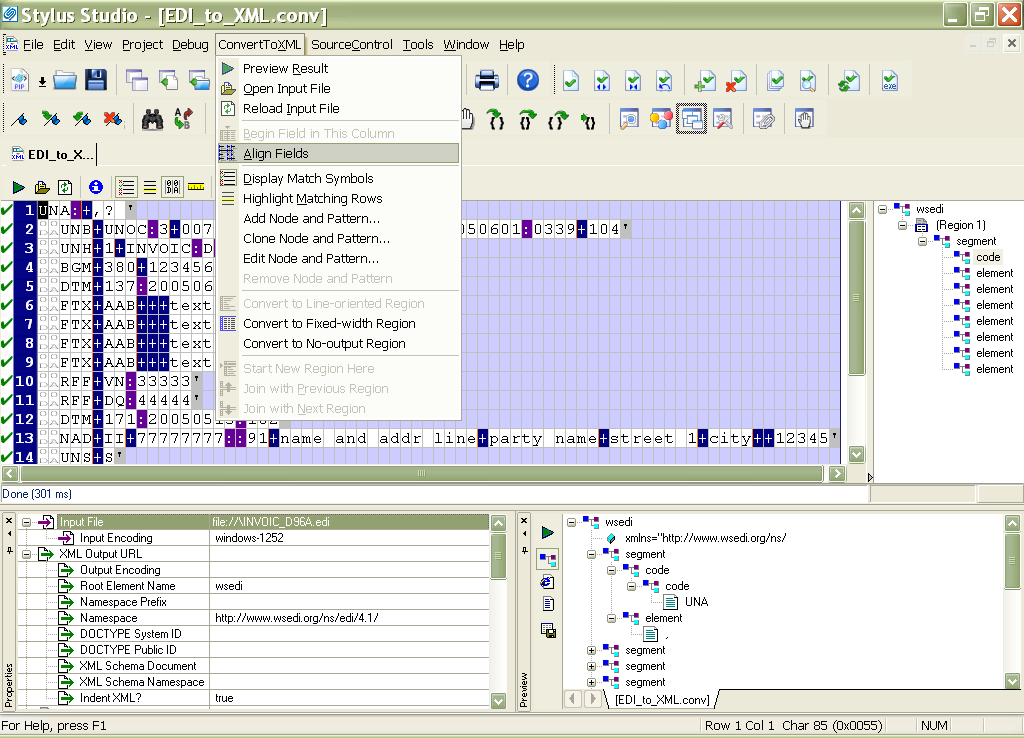
Custom XML Conversions let you visually convert EDI and other flat-file formats like CSV, binary, and dBase to XML data
XQUERY MAPPER, EDITOR, DEBUGGER, AND PROFILER
Stylus Studio boasts the most sophisticated XQuery development tools for any XML data integration project – it already provides full support for the January 2008 W3C XQuery Recommendation.
- XQuery Mapper lets you drag-and-drop XML sources to XML targets to automatically generate XQuery code; you can also load existing XQuery expressions into the Mapper for visual editing. Mapper is a great tool for learning XQuery.
- XQuery Editor with intelligent editing (Sense:X auto-completion, error checking) and an integrated query preview window. > XQuery debugging with breakpoints, stack trace, variable watch, XPath expression evaluation, step-in/step-out, and full XQuery language debugging.
- Query Plan lets you see how the XQuery processor will execute the XQuery code.
- XQuery Profiler for benchmarking and optimizing XQuery expressions.
- Support for DataDirect XQuery and Saxon XQuery processors.
- Support for SQL Server, Oracle, IBM DB2, MySQL, PostgreSQL, Sybase and Informix.
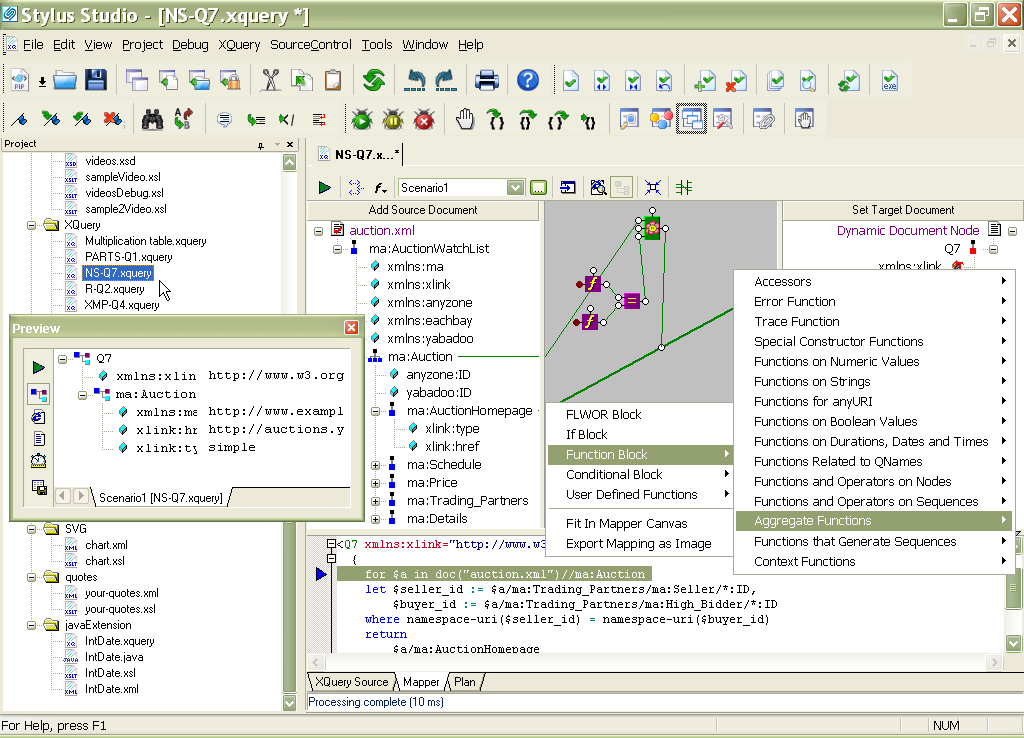
Stylus Studio's innovative XQuery Mapper accelerates XQuery development with an intuitive visual programming environment featuring a synchronized XQuery source code view. Just draw the relationships between XML sources and targets, specify the integration logic, and Stylus Studio does the rest. Run and test your code with one click!
XSLT MAPPER, EDITOR, DEBUGGER, DESIGNER, AND PROFILER
Stylus Studio is the world's most advanced development environment for XSLT 1.0/2.0.
- The XSLT Mapper lets you map one XML document to another with a series of drag-and-drop operations. As you draw the graphical maps, Stylus Studio generates the XSLT code. A text pane shows you the code as you map!
- The XSLT Editor provides a robust template editing view with intelligent editing support for XSLT 1.0/2.0 and XPath 1.0/2.0.
- Integrated XSLT 1.0/2.0 debugger allows you to control every aspect of an XSLT stylesheet transformation.
- Support for Saxon, MSXML, System.XML and the Stylus Studio XSLT processors.
- An XSLT Profiler for identifying and eliminating stylesheet performance bottlenecks.
JAVA AND C# FOR .NET CODE GENERATION
Stylus Studio 2011 XML Enterprise Suite allows you to generate Java code or C# for .NET based on any XQuery or XSLT document. You can specify options such as the package and class names and whether or not you want to make generated classes public.
XML SCHEMA DESIGNER WITH DOCUMENTATION GENERATOR
The new XML Schema Designer is a graphical editor for generating, viewing, and editing XML Schema. Advanced developers can also edit source files directly in text mode. Sense:X auto-completion helps to ensure well-formed and valid XML Schema. Features include:
- Browsing, editing, and validating schema in either text, tree, or diagram mode.
- Graphical diagrams that represent element structure, simple and complex types.
- XML Schema documentation generator.
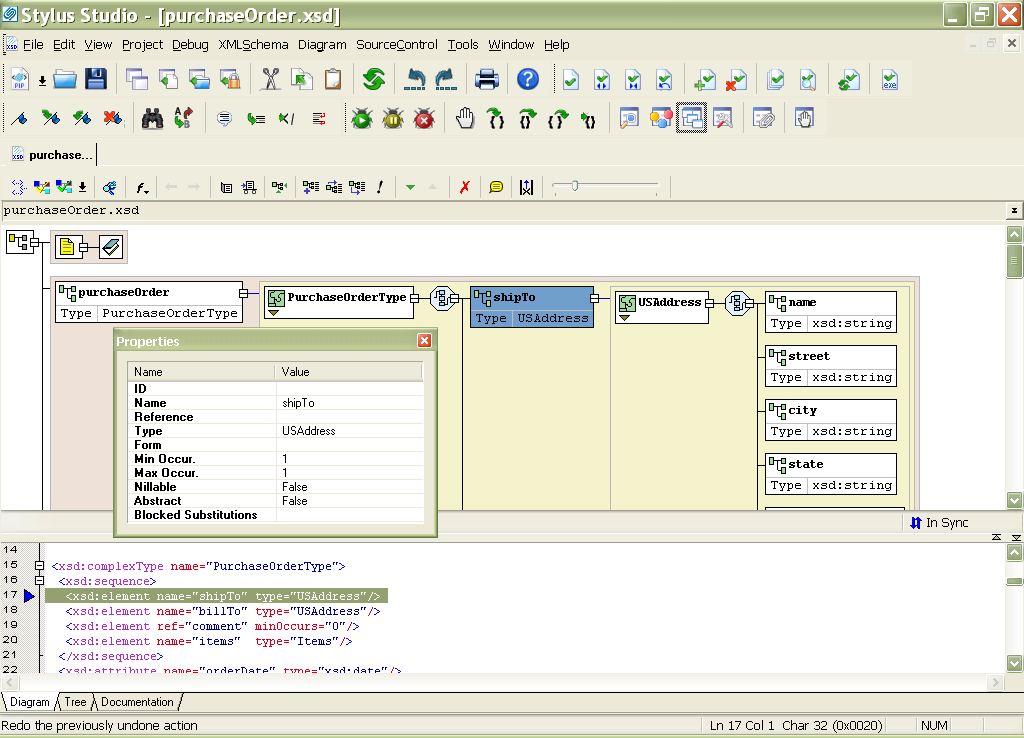
The XML Schema Designer lets you visually develop advanced XML data models
XML EDITOR WITH FULL XPATH INTEGRATION
Stylus Studio provides XML editing facilities for the creation and editing of XML documents. Features include:
- Text, tree, and grid editing views.
- Support for large documents (multi-gigabytes in size).
- Integrated XPath Sense: X auto-completion with back-mapping of query results to source document.
- Syntax coloring and Sense:X auto-completion of elements, tags, and attributes
- Schema validation and creation of new schemas with the click of a button.
- Support for XPath 1.0 and 2.0.
XML DIFFERENCING
An integrated XML Differencing tool simplifies visualizing of changes made to files or folders.
- One-click differencing of XML files and folders using a customizable color-coded XML text or tree views.
- Support for one-to-one and many-to-one XML file differencing.
- View differences using split-screen and merged changes tree views, or in the new split-screen text view.
- Step through XML differences node by node.
- Expand/collapse identical XML blocks to simplify the display.
- Optionally resolve or ignore XML entity references and XML namespaces.
- XML differencing settings allow you to optionally compare or ignore XML comments, XML element content, whitespace, XML attributes, XML processing instructions, formatting characters, and more.
WEB SERVICE DEVELOPMENT TOOLS
Use Stylus Studio to compose a SOAP request and test a Web service without writing any code! The SOAP requests you create can be used in XQuery to provide a dynamic data source for XML transformations. Use the Stylus Studio WSDL Editor for a complete Web services application development solution. Supports MS .NET and Apache Axis.
SUPPORT FOR INDUSTRY STANDARD PROCESSING COMPONENTS
Stylus Studio is the only XML IDE to provide truly integrated support for all of the leading XML processing, validation, and transformation engines, including Microsoft MSXML, System.XML, Apache Xerces, Apache FOP, Saxon, XSV, DataDirect XQuery, DataDirect XML Converters, RenderX XEP and others, enabling you exactly replicate and test production settings in your development environment.
About Stylus Studio
Stylus Studio is the only XML IDE to provide truly integrated support for all of the leading XML processing, validation, and transformation engines, including Microsoft MSXML, System.XML, Apache Xerces, Apache FOP, Saxon, XSV, DataDirect XQuery, RenderX XEP and others, enabling you to exactly replicate and test production settings in your development environment.
DataDirect and Stylus Studio are registered trademarks of Progress Software Corporation or one of its subsidiaries or affiliates in the U.S. and other countries. Any other trademarks or service marks contained herein are the property of their respective owners.