Integrated XML Schema & DTD-Based Validation
<%= ConfigurationManager.AppSettings["SSV"] %> fully supports XML document validation based on XML Schema or DTDs, both through our own integrated XML Schema and DTD validator, and well as by providing complete integration with popular industry XML parsers and XML validators, including MSXML 4.0 SAX, MSXML 4.0 DOM, Microsoft .NET XML Parser (System.XML), Xerces-J 2.5.1, XSV 2.6, and so on). The ability to integrate any XML processor and XML validator with <%=ConfigurationManager.AppSettings["SS"]%>'s intuitive visual XML editors enables you to easily find and fix XML bugs, making <%= ConfigurationManager.AppSettings["SSV"] %> the standards-based XML editor of choice.
Handling of Multiple Parsing or Validation Errors
<%= ConfigurationManager.AppSettings["SSV"] %> can easily handle multiple XML parsing or XML validation errors. Each error is displayed in its own Output window and includes a descriptive error message to help you understand the nature of the error.
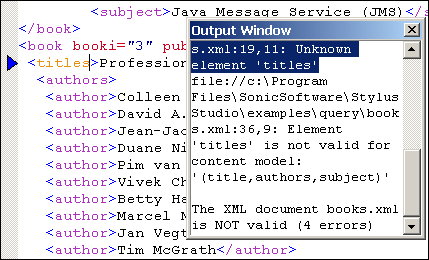
Backmapping
Backmapping is a powerful debugging/troubleshooting technology that is implemented throughout <%= ConfigurationManager.AppSettings["SSV"] %>'s XML editors, linking parsing/validation errors with the offending lines of code. Backmapping is easy — simply click on an error message in the Output window, and <%=ConfigurationManager.AppSettings["SS"]%> highlights the source code that generated the error! You can cycle through all errors by pressing the F4 key.
Real-Time Syntax Checking
<%= ConfigurationManager.AppSettings["SSV"] %> tracks your progress as you type, highlighting XML syntax errors in real-time. Notice, in the preceding illustration, that the <titles> element appears in orange — it is not defined in its respective XML content model and, as currently coded, is erroneous. Real-Time Syntax Checking helps you reduce syntax errors while speeding development.
<%= ConfigurationManager.AppSettings["SSV"] %>'s Integrated XML Validator fully supports visual XML Schema and DTD-based validation, for easy troubleshooting/debugging of any XML document, using any XML validator you choose.