XML Grid View
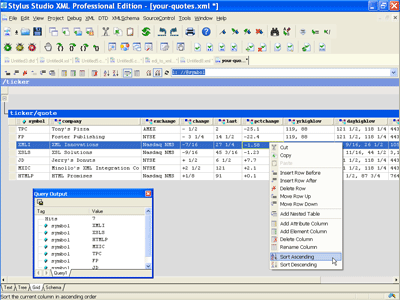
<%= ConfigurationManager.AppSettings["SS"] %> features an XML Grid View for editing tabular XML data (Online Video Demonstration; click to play). The XML Grid View provides an intuitive spreadsheet-like interface enabling developers to more productively work with relational data or any XML document with repeating data structures, addressing a need that frequently arises when working with raw XML data in typical XML data integration applications.
 (click to enlarge)
Insert, Delete, Edit, Move Rows, Copy/Paste, Undo/Redo
<%=ConfigurationManager.AppSettings["SS"]%>'s XML Grid View visually renders repeating XML data structures as tables, or grids. Each table row corresponds to one instance of the repeating pattern in the XML data source; each column represents an attribute or sub-element. The XML Grid view can make it easier to visually inspect and perform editing operations such as inserting or deleting an XML element instance, or changing the order of sub-elements. The XML Grid View provides full menu and tool bar support for all editing operations; intuitive drag-and-drop can also be used in several cases. Similarly, XML Grid View supports Copy/Paste as XML data or as tab-separated values, enabling you to share data with third-party applications such as Microsoft Excel, Microsoft Access, Lotus 123, or other spreadsheet applications.
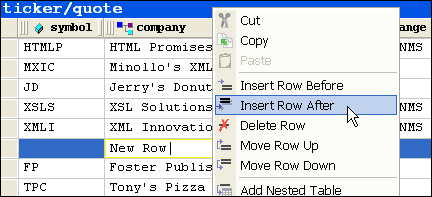
The following illustration shows a row being inserted into a table using the XML Grid View. <%=ConfigurationManager.AppSettings["SS"]%>'s XML Grid View also implements Undo/Redo and many other helpful XML editing features.
Sort in Ascending and Descending Order
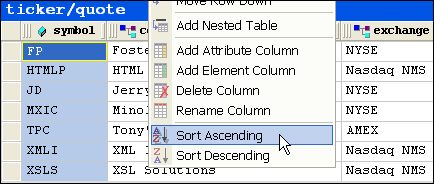
XML Grid View makes it easy to sort an XML document in a way similar to common spreadsheet applications. Simply right click on a table column and select Sort Ascending or Sort Descending. The XML Grid View automatically applies the changes throughout the entire XML document. The following illustration depicts a table sorted in ascending order based on the 'ticker' symbol column.
Add / Delete / Rename Element or Attribute 'Columns'
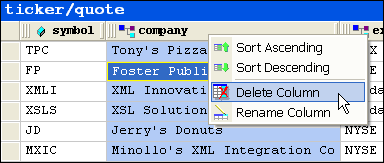
Each column in an XML Grid View table corresponds to a repeating element or attribute in an XML data structure. Using the XML Grid View, it is much easier to perform document-wide editing operations, such as renaming all of the elements or attributes, or adding/deleting elements or attributes to a table. The XML Grid View applies the requested editing operation to the entire table, that is, to every repeating instance of the XML data pattern.
Synchronized XML Editing
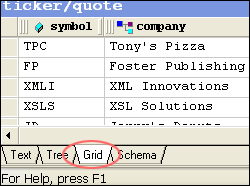
The XML Grid View is synchronized with <%=ConfigurationManager.AppSettings["SS"]%>'s other XML editing views, including the Text View and Tree View, providing XML developers with the flexibility to work with an XML document using a variety of different XML editing metaphors. To switch between XML editing views, click the appropriate tab at the bottom of the XML Editor module, as shown here:
<%= ConfigurationManager.AppSettings["SSV"] %> XML Grid View provides a powerful, intuitive interface for working with tabular XML data.