EXSLT
<%=ConfigurationManager.AppSettings["SS"]%>'s XSLT tools provide integrated authoring support for EXSLT (also known as EXSL) — powerful extensions to XSLT 1.0 enabling you to automate and simplify many tasks including computing dates and times, performing mathematical computations, string manipulations and more.
Selecting an EXSLT Processor
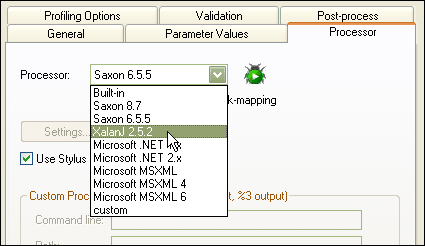
Using EXSLT in Stylus Studio is easy — there is no need to download any additional components because it our stylesheet development tools provide built-in support for all of the industry-standard XSLT processors, many of which natively support EXSLT. To get started, create a new XSL stylesheet by selecting "New" -> "XSLT", then click on the scenario properties dialog box, choose the properties tab, then select from the combo box an EXSLT-enabled processor, for example, Saxon 6 as illustrated here.
Importing The EXSLT Namespace
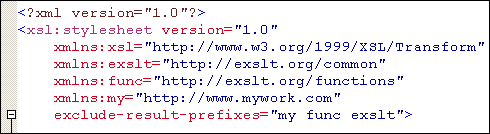
Now that you've selected an EXSLT processor to use, you'll need to declare the EXSLT namespaces (http://exslt.org/common and http://exslt.org/functions), to your
stylesheet code - do this by simply typing the following code as illustrated here:
Invoking an EXSLT Function
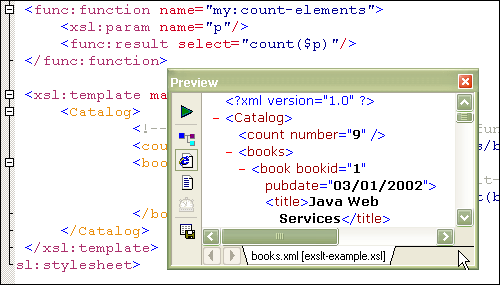
You have now completed all of the steps needed to develop and execute XSL 1.0 stylesheets that leverage EXSLT extension functions. To invoke the stylesheet, just click on the Run button (the green arrow) or type the F5 key as illustrated here. The results are displayed in the output preview window — in this example, we're invoking a function that counts the number of books. For more information about how to use EXSLT, visit their website and consult the API documentation.
EXSLT Syntax Help
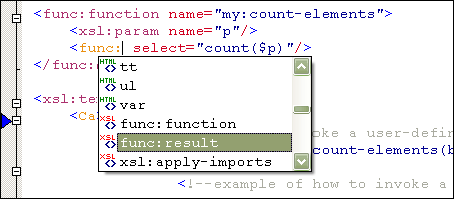
Stylus Studio provides some additional basic-level support for writing extension functions using EXSLT - as you type in the XSLT editor, Stylus Studio will suggest various elements, parameters and provide other intelligent editing and code-completion help on the fly, as illustrated here.
EXSLT Examples
All of the example files used in this tutorial (the XSL stylesheet and the XML instance document) are available for free download — just unzip the files
to a directory, download, Stylus Studio, open the .xsl file then hit the F5 key to run the stylesheet.
EXSLT (or EXSL) provides a great way to get more out of XSLT 1.0 stylesheets, and Stylus Studio is pleased to provide development tools support for this innovative technology. Stylus Studio also supports XSLT 2.0 which also supports a standard mechanism for defining and running stylesheet functions. Get started using by downloading a free trial today.