Convert CSV to XML
A very common problem is dealing with data that comes in as comma separated values. Using that data with XML couldn't be easier — just click File > Open on the <%=ConfigurationManager.AppSettings["SS"]%> menu, choose the file you want, and then check the "Convert to XML using adapter" box.
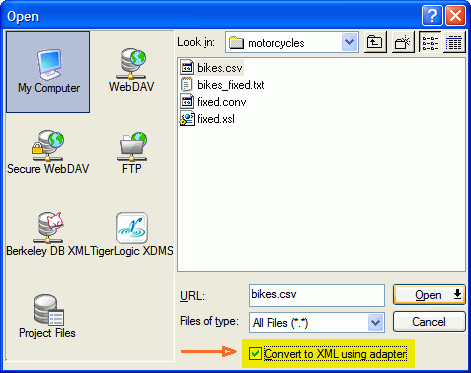 "/>
"/>
A secondary dialog box will appear, giving you options to fine-tune the adapter action. Selecting the CSV adapter and using the defaults, we are on our way!
Please Note: <%=ConfigurationManager.AppSettings["SS"]%> also offers Convert to XML, the world's most powerful legacy integration tool for getting any data format, including CSV, EDI, Binary data, etc. into XML. Convert to XML includes a visual adapter designer in addition to a streaming deployment adapter — these together make up an easy-to-use yet extremely fast and powerful design/deploy pair.
Specifying Input Settings
The CSV-to-XML Adapter provides a great deal of flexibility, allowing you to choose the file encoding used in the source document you wish to convert.
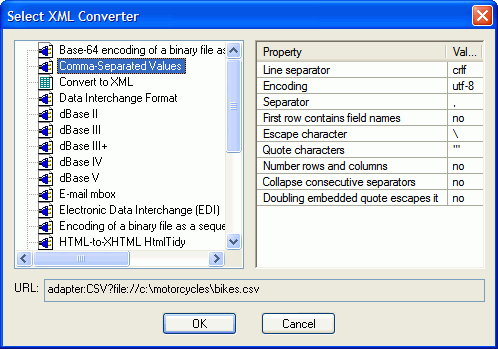
Current ISO, UTF, and ASCII standards are among those supported by the CSV-to-XML Document Wizard.
Let Stylus Generate Column Names, or Use Those Supplied
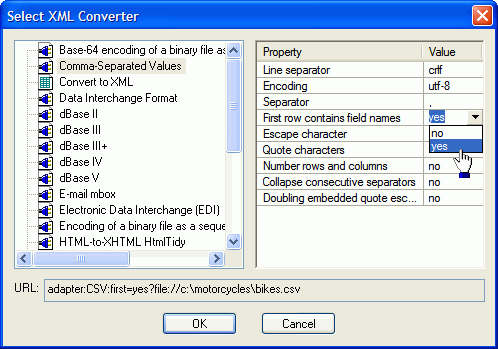
<%=ConfigurationManager.AppSettings["SS"]%> provides two ways to specify the CSV file column names. Column names are used as the element names for the rows in the generated XML document.
If you choose to have them generated, <%=ConfigurationManager.AppSettings["SS"]%> creates column names for you using an easily identified tag (&#lt;column.1&#gt;, &#lt;column.2&#gt;, and so on) for each column specified in the CSV. If the CSV you're converting to XML already contains column names, you can indicate that as well.
Specifying Delimiters and Quotes
It might seem simple when someone says "CSV", but it turns out there a dozens of variations on a theme that complicate matters. For example, how do you represent quotes inside of a field? Do single quotes also work for delimiters? Should doubled quotes inside of a field be treated as two quotes, or one quote being escaped? If a row contains multiple separators in a row, should they be treated as one (collapsed together), or should two in a row signify an empty field? This adapter, although simple, lets you tweak all of those settings.
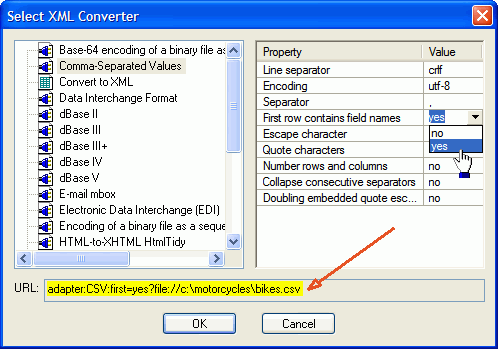
The URL Tells It All
The adapter: URI scheme hooks in a custom URI resolver that provides
on-the-fly translation from native formats to XML. The URI can be used in other places
besides the editor — as input or even output for
XSLT,
XQuery,
Pipelines, or used directly as part of
embedded converters that you call from your own programs.
It Can Read, It Can Write
To write CSV data, the same method can be used as reading. Just specify the output destination as going through the adapter URI. From the editor, this is easy, since that URI is associated with the open file.
This means that you can open a CSV file, have it appear in the editor as XML, change it, and when you save it it turns back into CSV — all automatically.
This also means that you don't have to mess with counting commas and quoting fields when writing CSV from your XSLT or XQuery. You can just write a simple XML output structure with a root and rows and columns within those rows, and the adapter will align up everything properly — even providing extra separators where one row doesn't have all of the fields.
<%=ConfigurationManager.AppSettings["SS"]%>'s CSV-to-XML Adapter is an easy way to leverage data stored in a CSV file as XML through one-time data conversion operations. Advanced CSV to XML mappings such as applications which require dynamic CSV to XML as part of a run-time application should be done using Convert to XML, which includes integration with the Stylus Studio Java Code Generator to generate the program code required to automate such CSV to XML data conversions. For CSV to XML data conversions involving both reading and writing to CSV files, try writing your own custom XML adaptors.
Other more complicated cases come up with fixed-width files, or files with varying record layouts.
Next XML Data Conversion Utility: ADO to XML
<% // a href="/xml_file_explorer.html" runat="server" browse /a %>