Home >Online Product Documentation >Table of Contents >How XML Converters are Used in Stylus Studio
How XML Converters are Used in Stylus Studio
The DataDirect XML Converters conversion engine is used throughout Stylus Studio to convert non-XML files to XML and vice-versa. You can access DataDirect XML Converters:
- When you open and save files
- In the EDI to XML module (see Chapter 4 Converting EDI to XML for more information on this module)
- As XML pipeline ConvertToXML and ConvertFromXML nodes (see Chapter 14 Building XML Pipelines for more information)
- Using the converter:URI scheme
Example
When you open or save a file in Stylus Studio, you have the option of converting that file to or from XML using DataDirect XML Converters, as shown in the following illustration:
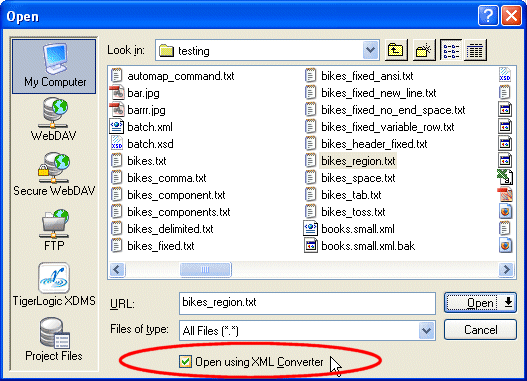
In the Open dialog box and elsewhere in Stylus Studio, you can choose an XML Converter for a
- Specific file format (like EDI, CSV, dBase, or RTF, for example). See Types of XML Converters for a complete list of standard files supported by the XML Converters.
- Custom file definition created using the Stylus Studio Custom XML Conversion Definition Editor. You can create custom XML conversion definitions to handle proprietary file formats or extensions to formats already supported by DataDirect XML Converters.