Home >Online Product Documentation >Table of Contents >Validate Nodes
Validate Nodes
Validate nodes represent an XML Schema document used to validate XML piped to it from another node.
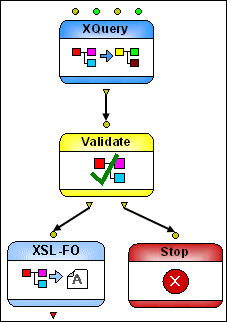
You can create a Validate node by dragging an XML Schema document (.xsd) and dropping it directly on the XML pipeline canvas, or you can drop an XML Schema document on an existing Validate node.
Using Multiple XML Schemas
A Validate node can represent multiple XML Schemas. You can add additional XML Schemas by simply dragging and dropping the XML Schema document (.xsd) on the Validate node, or you can use the following procedure.
To add additional XML Schemas to a Validate node:
The properties for the validate node are displayed in the Properties window.
 ) when it appears.
The Select Multiple URLs dialog box appears.
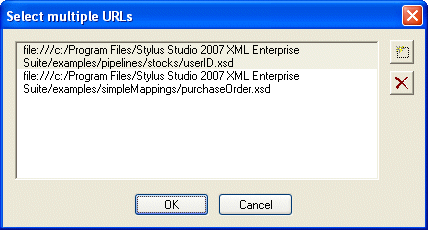
 ) to display the Open dialog box, which you can then use to navigate to the XML Schema you want to add to the Validate node.
Input Port
The Validate node has a single input port that you use to specify the XML you want to be validated by the XML Schemas specified by the Validate node's XML Schemas property. You can specify a default value, or the value can be dynamic (the output from another node in the XML pipeline, for example).
Output Ports
Validate nodes have two output ports, named Output valid and Output invalid, which you use to direct the flow of the XML pipeline. Typically, the Output valid port is piped to another transformation in the XML pipeline, while the Output invalid port is piped to a node like Stop or Warning.