Home >Online Product Documentation >Table of Contents >The Types Element
The Types Element
You use the Types element to specify the XML Schema (xsd:schema) that is used to describe the structure of a WSDL Part.
A WSDL document can have only one Types element; it must be named "types."
How to Create a Types Element
To create a Types element:
Alternative: Right-click the Definition element and choose Add > Types from the shortcut menu.
Stylus Studio adds a Service element to the WSDL.
Types Element Properties
The Types element has no editable properties.
Adding a Schema Element
Once you add the Types element to the WSDL, you then add one or more Schema elements. A Schema element represents an XML Schema, and is created using the xsd namespace by default:
Once it is part of the WSDL definition, you work on a Schema element as if it were an XML Schema in Stylus Studio. For example, you can either define the XML Schema's elements, attributes, global types, and so on directly in the WSDL, as shown in Figure 414, or you can use the Schema element to reference existing XML Schemas (Diagram > Reference Schemas).
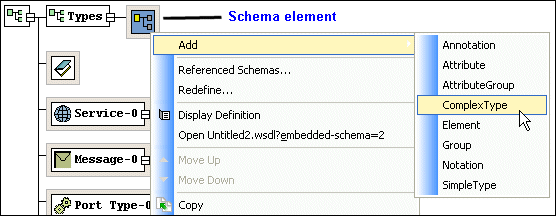
See Working with XML Schema in Stylus Studio for more information about creating XML Schema elements from scratch. See Referencing External XML Schemas to learn about importing and including existing XML Schemas.
How to Create a Schema Element
To create a Schema element:
Alternative: Right-click the Types element and choose Add > Schema from the shortcut menu.
Stylus Studio adds a Schema element to the WSDL.
Schema Element Properties
See About xsd:schema Properties for more information.