%@ page language="C#" masterpagefile="~/templates/Documentation.master" inherits="Page" pagetitle="Different Results from Similar Queries" keywords="Different Results from Similar Queries"%>Chapter 1: Getting Started with Stylus Studio®Chapter 2: Editing and Querying XMLChapter 3: Converting Non-XML Files to XMLChapter 4: Converting EDI to XMLChapter 5: Working with XSLTChapter 6: Creating XSLT Using the XSLT MapperChapter 7: Debugging StylesheetsChapter 8: Defining XML SchemasChapter 9: Defining Document Type DefinitionsChapter 10: Writing XPath ExpressionsAbout the XPath ProcessorUsing the XPath Query EditorSample Data for Examples and PracticeGetting Started with QueriesObtaining All Marked-Up TextObtaining a Portion of an XML DocumentObtaining All Elements of a Particular NameObtaining All Elements of a Particular Name from a Particular BranchDifferent Results from Similar QueriesQueries That Return More Than You WantSpecifying Attributes in QueriesFiltering Results of QueriesWildcards in QueriesCalling Functions in QueriesCase Sensitivity and Blank Spaces in QueriesPrecedence of Query OperatorsSpecifying the Nodes to EvaluateHandling Strings and TextSpecifying Boolean Expressions and FunctionsSpecifying Number Operations and FunctionsComparing ValuesFinding a Particular NodeObtaining a UnionObtaining Information About a Node or a Node SetUsing XPath Expressions in StylesheetsAccessing Other Documents During Query ExecutionXPath Quick ReferenceChapter 11: Working with XQuery in Stylus StudioChapter 12: Composing Web Service CallsChapter 13: Working with WSDL DocumentsChapter 14: Building XML PipelinesChapter 15: Publishing XML DataChapter 16: Integrating with Third-Party File SystemsChapter 17: Extending Stylus StudioChapter 18: The Stylus Studio Java APIChapter 19: Stylus Studio GUI ReferenceHome >Online Product Documentation >Table of Contents >Different Results from Similar Queries< Previous| Next > Different Results from Similar Queries Some queries can look very similar but return very different results. The following figure shows this.< Previous| Next >
Home >Online Product Documentation >Table of Contents >Different Results from Similar Queries
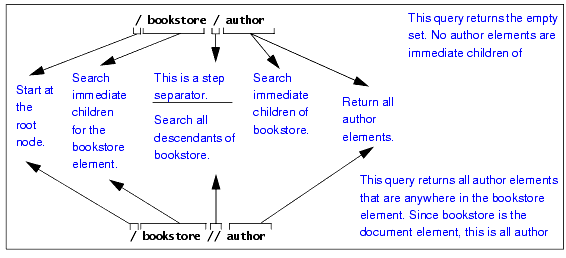
Some queries can look very similar but return very different results. The following figure shows this.