Home >Online Product Documentation >Table of Contents >Source Documents and XML Instances
Source Documents and XML Instances
As described previously, Stylus Studio uses the source documents you specify to display a structure you can use to create mappings to the target structure. In addition to the document structure, Stylus Studio needs document content information in order to compose a correct XSLT stylesheet. You provide this information by associating a XML instance to each source document you specify.
Types of associations
Source documents can have one of three associations, each of which has implications for the XPath expressions written by Stylus Studio, which uses these documents when it composes the XSLT stylesheet. A source document can be associated with
Note
|
| The previous example shows the XSLT that results when an XML document is used to specify the source structure. This is not possible with XSD or DTD source documents. |
- The XML document specified in the XSLT scenario. Only one source document can be associated with the XSLT scenario. In this situation, Stylus Studio does not generate the
document()function in the XSLT stylesheet. In this situation, thedocument()function is not necessary because Stylus Studio uses the XSLT input document specified in the Scenario Properties dialog box.
By default, Stylus Studio uses the first XML document you add to the XSLT mapper as the source XML for the XSLT scenario, as shown here:
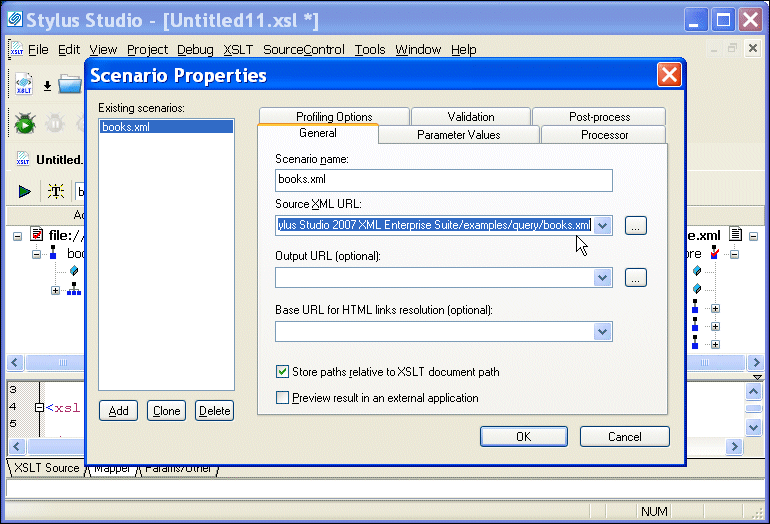
The document specified in the Source XML URL field on the Scenario Properties dialog box is the document to which the XSLT is applied when you preview the XSLT. You can select this association for another XML document if you choose, but only one source document may have this association.
Note
|
| If you specify an XML document as the first source document, Stylus Studio creates a scenario for you automatically, using that document as the scenario's source XML. If you specify some other type of document (XSD or DTD), Stylus Studio prompts you to create a scenario - and to specify an XML document as the source - when you preview the XSLT. See Creating an XSLT Scenario. |
Source document icons
Stylus Studio uses different document icons to indicate how a source document structure is related to corresponding XML document content.
Icon
|
Meaning
|
|---|---|
 |
The source document is associated with itself. This is the default for most XML documents (and XML documents only).
|
 |
The source document is associated with default XML document specified in the Source XML URL field in the XSLT scenario. This is the case with the first XML document you add to XSLT mapper, but you can change this association manually if you choose. See How to change a source document association.
|
 |
The source document is associated with a separate XML document instance. XSD and DTD source documents are always associated with an XML instance.
|
How to change a source document association
To change a source document association:
The source document shortcut menu appears.