Home >Online Product Documentation >Table of Contents >Left and Right Mouse Buttons Explained
Left and Right Mouse Buttons Explained
You can use either the left or the right mouse button to perform the drag and drop operation used to create source-target mappings in the XSLT mapper.
If you use the left mouse button to perform the drag operation, the link always maps the source node to the target node without making any changes to the target structure. If you use the right mouse button, Stylus Studio displays a shortcut menu that provides you with alternatives for modifying the target structure.
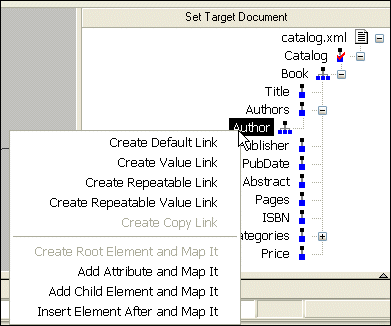
Using this menu, you can
- Map a source document node to an existing target structure node - this menu choice, Map to This Node, is the same as creating the link using the left mouse button.
- Add a source document node (element or attribute) as an attribute of the target structure node you select and map the two nodes.
- Add a source document node as a child element of the target structure node you select and map the two nodes.
- Add a source document node as a sibling of the target structure node you select and map the two nodes.
- Copy the entire source document node - its structure and its content - to the target structure and map it.