Translating XML documents to X12
The following is a demonstration of in-place editing of X12 content as well as programmatic changing of content, all to demonstrate the bidirectional nature of the EDI converter for X12.
Using the same steps as in Converting X12 to XML, we're going to edit an X12 document with the XML and then save it back out. We will then compare the before-and-after shots to see the change in the EDI file itself. This will demonstrate an XML document turning back into X12.
Then we'll see how this can be automated using XSLT.
Here are the steps for this demonstration:
- Open the X12 document in the XML editor
- Change XML X12
- Save XML document in X12 format
- See changed X12
- Use X12 document as output of XSLT
Open the X12 document in the XML editor
Perform the following steps:
- File|Open
- Select the input EDI file — for example x12-sample.txt
- Check the "Convert to XML using converter" checkbox
- Click the Open button
- Choose the "Electronic Data Interchange (EDI)" converter
- Click the OK button
Change XML X12
Since business has been so good, we're going to double our order quantities. (By the way, the 41 value in "Number of batches" means that the quantity is a count of batches, not that there are 41 batches. "41" is the X12 quantity code for "number of batches" — got it?)
Before:
<QTY>

  <QTY01><!--673: Quantity Qualifier-->41<!--Number of Batches--></QTY01>

  <QTY02><!--380: Quantity-->1</QTY02>

</QTY>

<QTY>

  <QTY01><!--673: Quantity Qualifier-->41<!--Number of Batches--></QTY01>

  <QTY02><!--380: Quantity-->2</QTY02>

</QTY>

<QTY>

  <QTY01><!--673: Quantity Qualifier-->41<!--Number of Batches--></QTY01>

  <QTY02><!--380: Quantity-->3</QTY02>

</QTY>

<QTY>

  <QTY01><!--673: Quantity Qualifier-->41<!--Number of Batches--></QTY01>

  <QTY02><!--380: Quantity-->4</QTY02>

</QTY>
After:
<QTY>

  <QTY01><!--673: Quantity Qualifier-->41<!--Number of Batches--></QTY01>

  <QTY02><!--380: Quantity-->2</QTY02>

</QTY>

<QTY>

  <QTY01><!--673: Quantity Qualifier-->41<!--Number of Batches--></QTY01>

  <QTY02><!--380: Quantity-->4</QTY02>

</QTY>

<QTY>

  <QTY01><!--673: Quantity Qualifier-->41<!--Number of Batches--></QTY01>

  <QTY02><!--380: Quantity-->6</QTY02>

</QTY>

<QTY>

  <QTY01><!--673: Quantity Qualifier-->41<!--Number of Batches--></QTY01>

  <QTY02><!--380: Quantity-->8</QTY02>

</QTY>
Save XML document in X12 format
Do File|Save As and pick a different destination filename making sure
that "Convert from XML using converter" is checked and the EDI converter is selected.
See changed X12
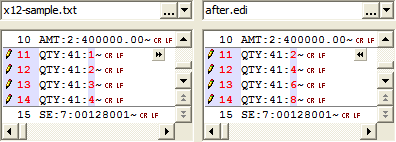
Using a 'diff' program to do a side-by-side comparison of the original file with the changed file shows that we were able to alter the X12 file without an X12-specific editor, or even opening the raw X12 file itself!
Use X12 document as output of XSLT
Let's take a moment and automate what we did — using the input document with a few adjustments to make an output X12 document. Either XSLT or XQuery will do, and we'll just arbitrarily choose the former for our demonstration. Again, what we are going to accomplish is to take an existing X12 document, and save it as a new X12 document with a few modifications.
- Use the XSLT code
x12-change.xslbelow - Set your input document to be the x12-sample.txt file, as passed through the EDI converter
- Set your output document to be
after.edi, also passing through the EDI converter - Run the stylesheet
<xsl:template match="/">
<xsl:processing-instruction name="edi_segment">~</xsl:processing-instruction>
<xsl:processing-instruction name="edi_element">:</xsl:processing-instruction>
<xsl:apply-templates select="node()"/>
</xsl:template>
<xsl:template match="QTY02">
<xsl:element name="{local-name(.)}">
<xsl:value-of select=". * 2"/>
</xsl:element>
</xsl:template>
<xsl:template match="node()">
<xsl:choose>
<xsl:when test="local-name(.) = '#text'">
<xsl:value-of select="."/>
</xsl:when>
<xsl:when test="local-name(.) = '#comment'"/>
<xsl:otherwise>
<xsl:element name="{local-name(.)}">
<xsl:apply-templates select="node()"/>
</xsl:element>
</xsl:otherwise>
</xsl:choose>
</xsl:template>
</xsl:stylesheet>
What this does is the same thing we just did, but mechanically. It finds the
QTY02
elements in the QTY segment and replaces whatever content text was there with double the
original value.
This code also filters out any comments to make the final output lean and mean (to see how to preserve them, see the
Translating XML documents to EDIFACT example).
You may have noticed two processing instruction lines being emitted. By default, the characters for segment terminator and element separator are different in the converter than they were in the input file. We can override them by setting them in the output stream, which we did to make our 'diff' easier to read.
In case you are curious, here are the PI directives that can be given, along with their default values:
<?edi_component : ?>

<?edi_element   + ?>

<?edi_decimal   . ?>

<?edi_release   ? ?>

<?edi_repeat    ~ ?>

<?edi_segment   ' ?>

<?edi_tertiary  & ?>
These also apply to the XML to EDIFACT converter.
The X12 can be generated completely from either XQuery or XSLT, and schemas can be generated against which to map and validate your X12 XML.
The converters are not limited to use within <%= ConfigurationManager.AppSettings["SS"] %>. They may be integrated into your own applications directly, using the data conversion API, or included as part of your file handling or XSLT/XQuery processing through the XML Converters.