Java Web Services
<%=ConfigurationManager.AppSettings["SS"]%>'s Web Service Call Composer simplifies Java Web Service development through its' support for finding, invoking and testing of any Java Web Service deployed on any popular Java Web Service framework, such as Apache AXIS. In Web Services tutorial, we'll use <%=ConfigurationManager.AppSettings["SS"]%> to invoke a Web service query using the Google API. The <%=ConfigurationManager.AppSettings["SS"]%> Web Service Call Composer is illustrated below:
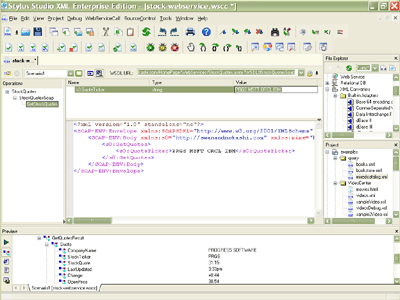
Composing a Java Web Service
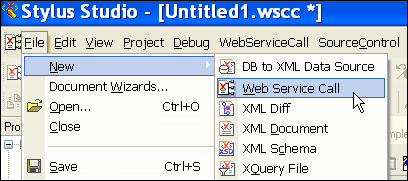
Creating a Java Web Service in <%=ConfigurationManager.AppSettings["SS"]%> is easy — start by selecting: File > New > Web Service Call, as illustrated here:
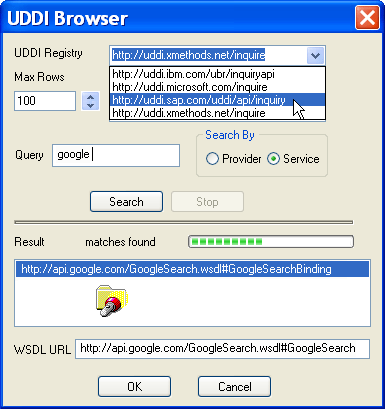
Locating a Java Web Service's WSDL file
<%=ConfigurationManager.AppSettings["SS"]%> includes a built in UDDI registry browser to locate a Web Service's WSDL file. Here we are searching a public UDDI registry for the location of Google API's WSDL file:
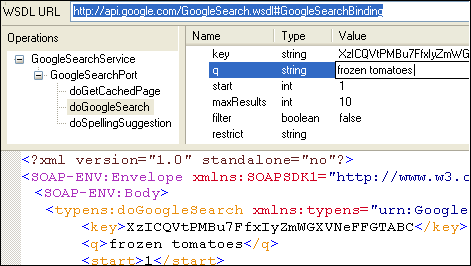
Invoking a Java Web Service
Now that we have Google's WSDL file, <%=ConfigurationManager.AppSettings["SS"]%> pre-populates a Web Service Call. Here we see the available Web service operations (doGoogleSearch, doGetCachedPage, doSpellingSuggestion), a Web service operation's parameters (q, start, maxResults, etc.), and an automatically generated SOAP envelope required to properly invoke the Web service operation. Note that if you set a parameter in the parameter window, the SOAP envelope is automatically updated to reflect that change. In the following illustration we are programmatically searching the Google database for "Frozen tomatoes".
 " width="471" height="266"/>
Inspecting the Web Service Results
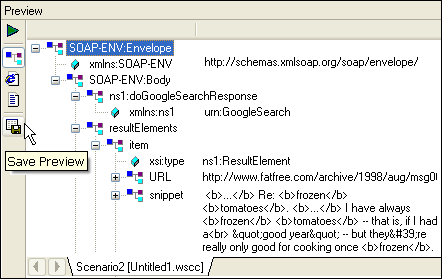
<%=ConfigurationManager.AppSettings["SS"]%> includes a built-in SOAP response preview window. It allows you to inspect the SOAP response returned from the Web service server. You can browse the results in Stylus Studio's various XML editing views, for example, tree view, text view, browser view and save the results to an XML file.
Build and Test Java Web Services with Apache AXIS
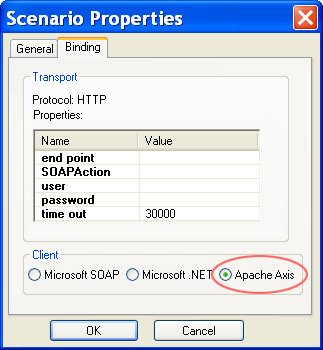
<%=ConfigurationManager.AppSettings["SS"]%> supports Web service development and testing on all of the major Web Services frameworks, including Apache AXIS, Microsoft SOAP Toolkit 3.0, and Microsoft .NET. <%=ConfigurationManager.AppSettings["SS"]%> allows you to create and save Web service call scenarios, which are associations of various properties and settings used to invoke a particular Web service. To choose Apache AXIS, check it off as your default Web service server as illustrated here:
<%=ConfigurationManager.AppSettings["SS"]%>'s Web Service Call Composer is a powerful tool for accelerating Java Web service application development