Sense:X: Intelligent XML Editing
Sense:X is <%= ConfigurationManager.AppSettings["SSV"] %>'s implementation of Intelligent XML Editing. It is much more than XML syntax coloring, XML code sensing, and XML code completion, however. Think of Sense:X as your very own, personal XML guide, right there at your fingertips, helping you get through any XML development challenge.
Intelligent XML Schema/DTD-Aware Code Sensing and Auto-Completion
<%= ConfigurationManager.AppSettings["SSV"] %>'s Sense:X is vastly superior to other XML editors' so-called "intelligent XML editing."
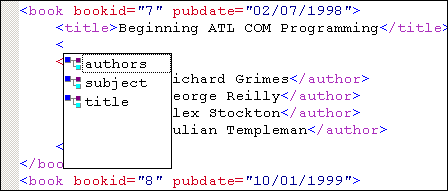
Here are a just a few examples:
- Intelligent Code Sensing: While you edit, <%=ConfigurationManager.AppSettings["SS"]%> displays a combo box of only those elements and attributes that are in scope (as determined from the XML document's model), relative to your cursor position. After all, what good is code sensing if your XML editor shows you every element and attribute, without respect to context?
- Intelligent Code Completion: Other editors blindly insert a closing element tag every time you enter an opening element tag. Only <%=ConfigurationManager.AppSettings["SS"]%> with Sense:X is smart enough to correctly infer when you intend to close a particular tag, and only insert the closing tag at that time.
- Automatic reloading of XML Schema/DTD: With <%=ConfigurationManager.AppSettings["SS"]%> and Sense:X, there's no need to manually close and re-open your XML documents after you make a change to your XML document's XML Schema or DTD. <%=ConfigurationManager.AppSettings["SS"]%> reloads XML Schemas and DTDs automatically when it detects a change.
- So Much More: Try <%= ConfigurationManager.AppSettings["SSV"] %> today for free!
Configurable Behavior
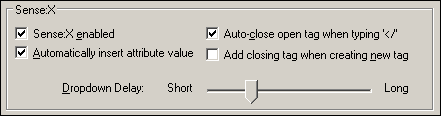
Absolutely everything about Sense:X is configurable, allowing you to override or customize behavior to your liking.
Configurable Appearance
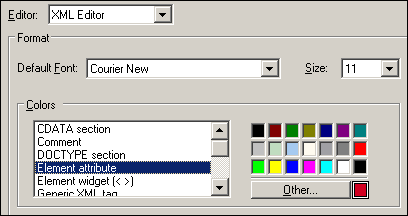
You can customize the appearance of all of <%=ConfigurationManager.AppSettings["SS"]%>'s editors individually. Fonts, newline format, file extensions, and so on, are all independently configurable for <%=ConfigurationManager.AppSettings["SS"]%>'s XML Editor, XSLT Editor, and XQuery Editor.
Support for Any XML Validator or XML Processor
Sense:X works with any underlying XML validation or transformation engine, including MSXML, Microsoft .NET XML (System.XML), Xerces, Xalan, Saxon, XSV, and others.
Sense:X for Databases, XSLT, XQuery, XPath, Java, JSP and Web Services!
Sense:X isn't limited to the XML text editor - we've implemented intelligent XML editing throughout all of our XML editing modules, including our XSLT Editor, XQuery Editor, XPath Evaluator, Java Editor, JSP Editor, Database-to-XML editor, and many others!
Overall, <%= ConfigurationManager.AppSettings["SSV"] %>'s Sense:X Technology
allows software developers to be more proficient and
productive with XML.