JSP Editor
<%=ConfigurationManager.AppSettings["SS"]%> includes a built-in JSP Editor, to enable XML developers to create dynamic JSP driven Web applications driven by XML data. <%=ConfigurationManager.AppSettings["SS"]%>'s Document Wizards are helpful tools for creating and editing XML documents, including JSP 1.0/2.0 files. Launch the JSP Editor by selecting File > Document Wizards as shown here:
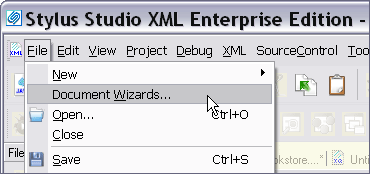 JSP Editor" width="370" height="174"/>
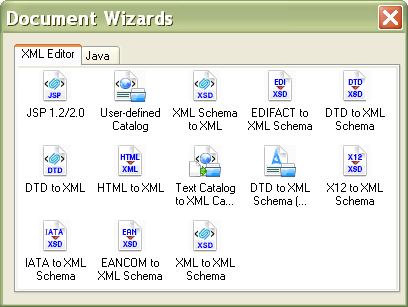
Next, choose the JSP 1.0/2.0 Wizard icon from the Document Wizard menu and <%=ConfigurationManager.AppSettings["SS"]%> will automatically launch the JSP Editor.
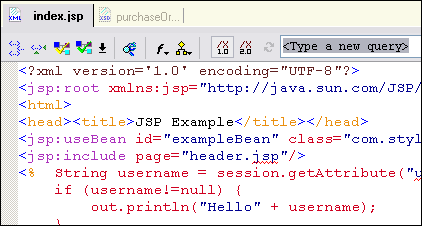
JSP, Java and HTML Syntax coloring:
<%=ConfigurationManager.AppSettings["SS"]%>'s JSP Editor supports Syntax of JSP tags, HTML elements & attributes, and the actual Java Code located inside JSP scriptlets. In the JSP scriptlet below, Java reserved words (e.g: if, extends, final, import, package, etc.) are in blue, Java objects and classnames are in grey, and java functions are colored brown.
Intelligent JSP Editing
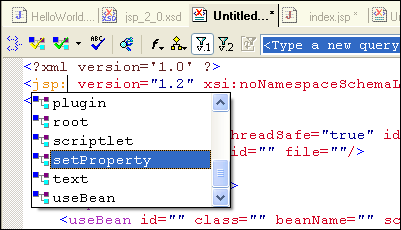
JSP technologies are XML based, and using the standard XML Schema for JSP with our XML editor, <%=ConfigurationManager.AppSettings["SS"]%> supports intelligent, context sensitive JSP code sensing and auto-completion. In this illustration, <%=ConfigurationManager.AppSettings["SS"]%> is suggests JSP tags from a list of available elements, including: jsp:scriptlet, jsp:setProperty, jsp:useBean, etc.
Powerful Related JSP Editing Utilities
In addition to our powerful JSP Editor, <%=ConfigurationManager.AppSettings["SS"]%> includes numerous other essential XML and Web development tools for JSP developers, including our HTML-to-XML Converter, XSLT stylesheet designer, Java IDE, XML editor, XML Schema Editor, etc. Shown below is an XML Schema for the JSP tag library specification, viewed in <%=ConfigurationManager.AppSettings["SS"]%>'s XML Schema Editor:
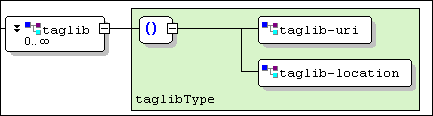 's XML Schema Editor" border="0" width="433" height="116"/>
<%=ConfigurationManager.AppSettings["SS"]%>'s JSP Editor and related XHTML/XML development features are useful tools for editing and working with XML enabled, JSP applications. Download a free trial now!