XML Spell Checker
Bad spellers, rejoice! <%= ConfigurationManager.AppSettings["SSV"] %> now features an integrated XML Spell Checker to help prevent those pesky, embarrassing spelling errors from ever appearing in your XML files.
Spell Checking an XML Document
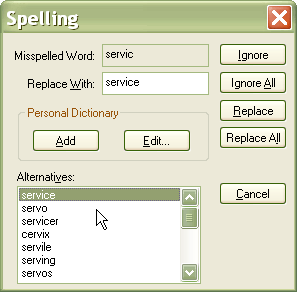
To invoke the <%= ConfigurationManager.AppSettings["SSV"] %> XML Spell Checker, select the Tools > Spell Checking from the <%=ConfigurationManager.AppSettings["SS"]%> menu. The XML Spell Checker, illustrated below, provides all of the standard spell checking options that you would expect from any word processor, including Ignore, Ignore All, Replace, Replace All, and Suggest Alternatives commands.
Integrated with the XML Text Editor
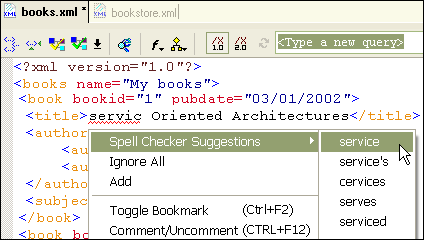
The <%= ConfigurationManager.AppSettings["SSV"] %> XML Spell Checker is seamlessly integrated with the XML Text Editor — as you type, suspected spelling errors in your XML file are highlighted using a red underline. You can easily fix the offending error by choosing the correct spelling from a list of alternatives, as shown here:
Configurable XML Spell Check Options
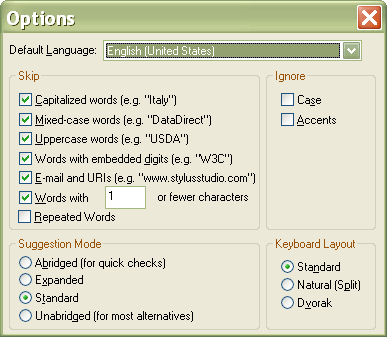
As the feature name suggests, the <%= ConfigurationManager.AppSettings["SSV"] %> XML Spell Checker provides many unique spell checking features and options which makes it well-suited for spell checking XML files. For example, the <%= ConfigurationManager.AppSettings["SSV"] %> XML Spell Checker ignores XML element and attribute names. You can configure other options from the Options window (select Tools > Options > General > Spell Checking from the <%=ConfigurationManager.AppSettings["SS"]%> menu), illustrated here:
You can use XML Spell Checker options to:
- Skip capitalized, mixed-case, and upper-case letters; words with embedded digits; e-mail addresses; URLs; short words; repeated words; etc.
- Ignore case and/or accents.
- Select a default English dialect (United States, United Kingdom, and Canada), with or without accents.
- Specify your keyboard layout (to aid in suggesting alternatives to misspelled words).
- Select an abridged, expanded, or standard suggestion mode.
Create Your Own Personal Dictionary
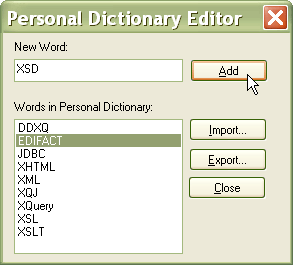
The <%=ConfigurationManager.AppSettings["SS"]%> XML Spell Checker allows you to build a personal dictionary. If your XML documents routinely make use of acronyms and obscure terms of art, you can easily add them to your personal dictionary. Creating a personal dictionary (illustrated below) saves time when checking for spelling errors in your XML document.
Engineers world-wide are notorious for their bad spelling. (Admit it, there's a reason you didn't become a marketing copywriter!) But now you can impress your colleagues with your brilliant command of the English language! (We'll let the <%=ConfigurationManager.AppSettings["SS"]%> XML Spell Checker be our little secret.)