Visual XML Editing Views (XML Viewer)
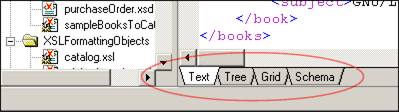
<%= ConfigurationManager.AppSettings["SSV"] %> includes three general purpose XML editing views: Text View, Tree View, and Grid View, allowing you to work with and edit XML documents in whatever way suits you best — it's the ultimate XML viewer and power editing tool for XML. A "Schema" tab provides a convenient way to view a document's associated content model (i.e. it's schema). In the event that no XML content model has been defined, you can just as easily use the "Schema" tab to generate XML Schema or to generate DTD. XML editing views are synchronized, and you can switch between them at any time simply by clicking the tabs at the bottom of the main editing window:
 (click to enlarge)
Text View
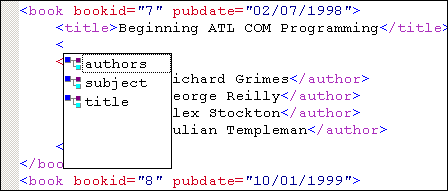
<%= ConfigurationManager.AppSettings["SSV"] %> includes a robust XML text editor with <%=ConfigurationManager.AppSettings["SS"]%>'s Sense:X (Intelligent XML Editing) built in. Sense:X provides support for syntax coloring, code sensing, XML auto-completion, and much more. Text view is ideal for hand-coding or editing XML documents and is complete with a full array of many powerful XML editing features (click on image to enlarge).
 (click to enlarge)
Tree View
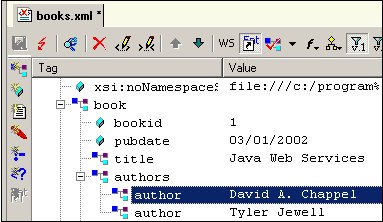
Tree View incrementally loads an XML file according to the nodes you expand, making it a great way to analyze and edit very large XML data files. Tree View is also useful in many other scenarios, such as DTD editing, generating XPath expressions to a particular node, and more.
Grid View
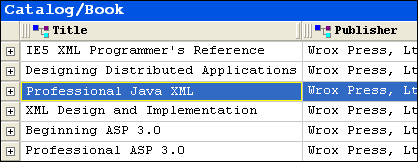
<%= ConfigurationManager.AppSettings["SSV"]%>'s newly updated Grid View is great for working with tabular XML data, providing an intuitive editing user interface that resembles a spreadsheet or database table.
<%= ConfigurationManager.AppSettings["SSV"] %> various synchronized XML editing views provides a flexible approach to XML editing, enabling you to choose an XML editing view designed to meet any XML editing need.