Xpath Generator
<%=ConfigurationManager.AppSettings["SS"]%> includes an XPath generator that helps you easily create XPath expressions. To generate an XPath expression, open an XML document in Tree View. Tree View allows you to quickly expand and collapse the nodes of an XML document. When you've found the XML element or attribute for which you want to construct an XPath expression, just right-click and choose Copy XPath Query to Clipboard from the shortcut menu, as shown in the following illustration. You can then paste the XPath expression generated by <%=ConfigurationManager.AppSettings["SS"]%> into any of <%=ConfigurationManager.AppSettings["SS"]%>'s XML editors.
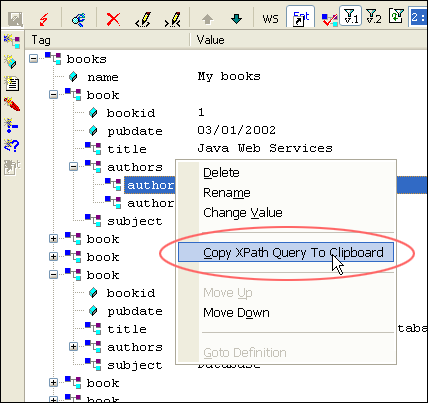
<%=ConfigurationManager.AppSettings["SS"]%>'s XPath Generator provides a convenient, straightforward way
to create potentially lengthy and complex XPath expressions.