Sense:X for XPath (XPath Editor)
<%=ConfigurationManager.AppSettings["SS"]%>'s intelligent code-sensing, auto-completion technology, Sense:X, is XPath-aware. You'll find Sense:X for XPath in all of <%=ConfigurationManager.AppSettings["SS"]%>'s editors, including the XML Editor, XSLT Editor, and XQuery Editor. In addition to XPath code-sensing and auto-completion, Sense:X for XPath provides syntax coloring and syntax checking for any XPath 1.0/2.0 expression or function.
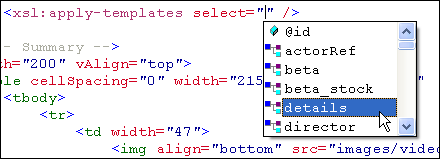
XPath Examples
The XPath editor is ideal for generating example XPath expressions. <%=ConfigurationManager.AppSettings["SS"]%>'s code-sensing and auto-completion displays a combo box only of those elements currently in scope, relative to the current context as identified by the text cursor. For example, in the sample XPath illustrated in the preceeding figure, the xsl:apply-templates statement, <%=ConfigurationManager.AppSettings["SS"]%> suggests the id attribute, and the actorRef, beta, beta_stock, details, and director elements because they are immediately in scope relative to the current template's context.
XPath Syntax Help
Additionally, <%=ConfigurationManager.AppSettings["SS"]%> provides code completion and syntax help for XPath functions such as concat() — Stylus Studio displays the function prototype (that is, the method signature) for the XPath function, and helps you choose the function arguments as well. Furthermore, <%=ConfigurationManager.AppSettings["SS"]%> helps you find the data nodes that you need for your XPath function by populating the combo box with available XPath axes such as ancestor::, child::, attribute::, parent::, preceding::, and so on.
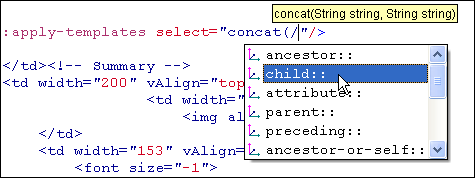
XPath Nodes
<%=ConfigurationManager.AppSettings["SS"]%> implements the same code-sensing and auto-completion throughout all editors, wherever an XPath expression is meant to be typed in. For example, in the following XQuery expression, <%=ConfigurationManager.AppSettings["SS"]%> suggests available XPath nodes and functions as you type.
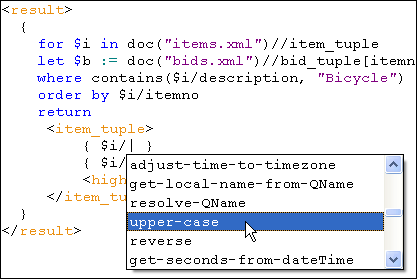
The XPath editor uses context-sensitive code-sensing to display helpful editing hints — including auto-completion, functions, function prototypes, axes, and syntax coloring — wherever an XPath expression needs to be edited. These features accelerate XPath development, help prevent errors, and aid the XPath learning process.
Next XPath Feature: XPath Generator