XPath Query Editor
<%=ConfigurationManager.AppSettings["SS"]%>'s XML Editor has an XPath Query Editor that helps you visually analyze, test, and debug XPath expressions against any XML instance document. This convenient docking window can be placed anywhere on —or outside— the Stylus Studio desktop.
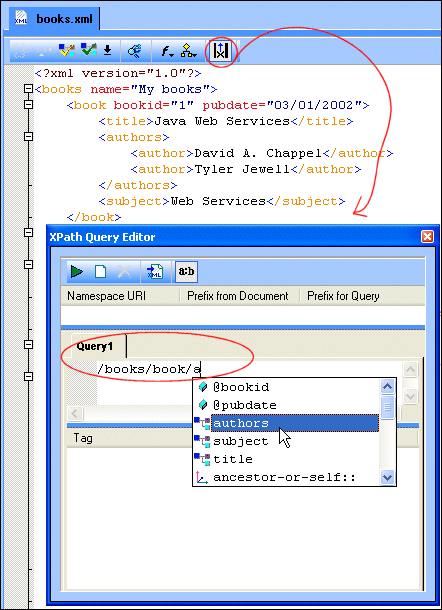
To get started, just click the Show XPath Query Editor button at the top of the XML Editor, or click View > XPath Query Editor.
Working With XPath Expressions
Using the XPath Query Editor is easy! Just type a valid XPath expression on the Query 1 tab. (This number is incremented for each new XPath query expression you create. Stylus Studio lets you write, test, and save up to 64 queries for an XML document! <%=ConfigurationManager.AppSettings["SS"]%> automatically saves your XPath expressions in the project associated with the XML document, making it easy to reuse expressions with any XML document in the project.) As you type, <%=ConfigurationManager.AppSettings["SS"]%> alerts you to any errors in your XPath expression — and auto-completion helps speed typing and eliminate errors, so you can be sure that the expression you're submitting is always valid.
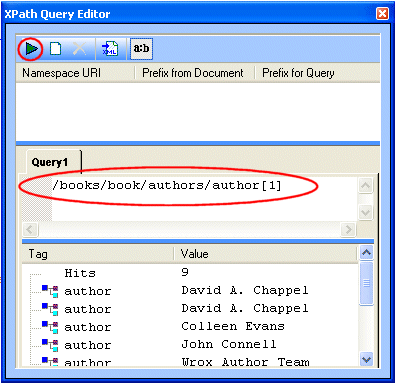
To view the results of your XPath expression, just click the Execute Query button (or press F5). The results of the XPath expression executed against the current document and are displayed in the results panel of the XPath Query Editor window.
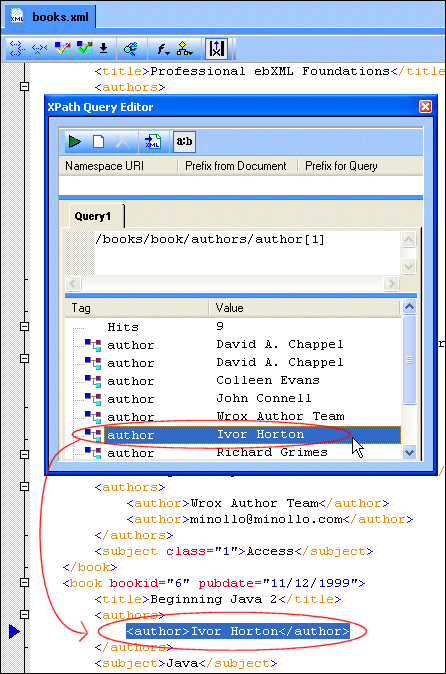
<%=ConfigurationManager.AppSettings["SS"]%>'s XPath Query Editor supports our backmapping feature — you can click on any node in the XPath result set, and <%=ConfigurationManager.AppSettings["SS"]%> highlights the corresponding node in the original XML input document.
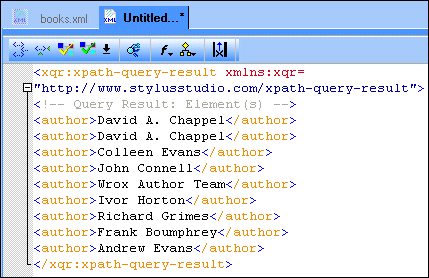
And if you like (or need) what you see in the result, you can save it as an XML document with the click of a  button!
To help you enter precise and appropriate XPath expressions, the XPath Query Editor includes an XML namespaces (xmlns) pane, like the one shown here:
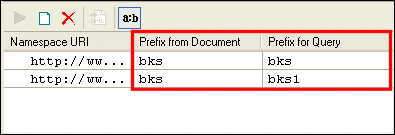
In addition to the namespace URI, Stylus Studio displays the namespace prefix declared in the XML document, if any, and a prefix that is used when creating XPath query expressions. If one namespace prefix clashes with another in the XML document, Stylus Studio renames the second prefix by adding a number to the end of the original prefix name to make it unique — for example, if two namespaces have the prefix bks, the second is renamed bks1.
In summary: <%=ConfigurationManager.AppSettings["SS"]%>'s XPath Query Editor, with its ability to save result sets as XML documents, save up to 64 XPath expressions, backmapping from results to the source XML, and namespace prefix tool, provides an inuitive way to visually analyze and verify even the most advanced XPath expressions.
Next Document XPath Feature: XPath Editor