XSLT Mapper
<%=ConfigurationManager.AppSettings["SS"]%>'s powerful XSLT mapper lets you visually work with any XSLT file, mapping data from one or more input files to any output format. An example of an XSLT mapping project is shown here.
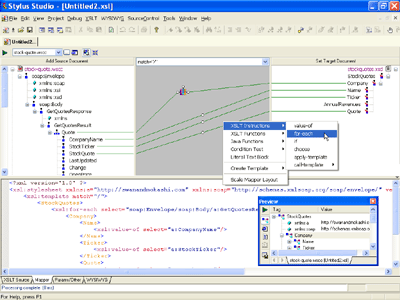 (click to enlarge)
True XSLT Mapping (Two-way, Synchronized Editing)
The XSLT Mapper is easily accessible by clicking the Mapper tab at the bottom of the main XSLT editing window. The XSLT Mapper displays input documents on the left, and the target on the right. To map your data, simply drag source nodes and drop them on the target, connecting the data sources to the desired data output. On the XSLT Source tab, you can see the XSLT that <%=ConfigurationManager.AppSettings["SS"]%> has composed for you, based on the source-target relationship defined in the mapping operation. Note that the reason why we call it true XSLT mapping is that the code being generated by our visual XSLT mapper is none other than the official industry-standard W3C XSLT and XPath code — it's worth noting that this approach is quite different from the proprietary XML mapping formats used by some competitors in this industry. Creating XSLT has never been so easy!
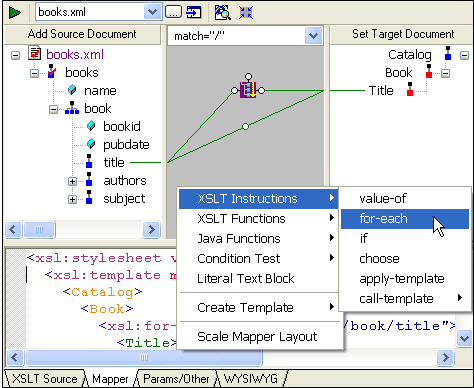
<%=ConfigurationManager.AppSettings["SS"]%>'s XSLT Mapper is a true two-way, synchronized editor - the only XSLT mapper to support true round-trip engineering — this means that both the visual model and the XSLT source code can be edited, and any changes you make to the XSLT code result in changes to the visual model, and vice versa. <%=ConfigurationManager.AppSettings["SS"]%> is the only XML IDE to support true XSLT mapping in this fashion — it's so intuitive that even folks new to writing complex XSLT mapping applications will find it easy to Learn XSLT.
Support for XSLT Functions, Java Functions, Conditional Tests
Data integration applications require the flexibility to perform customized data processing. This can mean adding flow control logic blocks (such as xsl:for-each, xsl:if, xsl:choose, xsl:call-template, xsl:apply-template, and so on), using standard XSLT data processing functions (such as concat(), count(), position(), and contains()), performing logical comparisons, or invoking custom data processing methods implemented in a programming language such as Java. <%=ConfigurationManager.AppSettings["SS"]%> supports all of these logical expressions and more! To add any data processing logic, simply right click on the mapping canvas (the grey area flanked by the source and target panes) and select the desired operation.
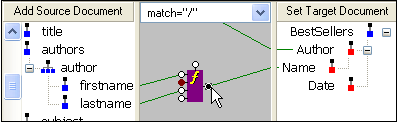
Flow control and data processing code is represented in <%=ConfigurationManager.AppSettings["SS"]%>'s XSLT Mapper as a colored block. Each block has one or more input and output ports, which are linked to the respective input and output data models. In the preceding illustration, the firstname and lastname elements have been concatenated, along with a non-breaking space acting as a separator; the output is fed into the Name data element in the target document. The port on the top of the function block is a flow control interface, allowing you to chain together multiple functions, or to perform a test based on conditions. In a similar fashion, you can easily register Java classes and pass parameters from the XSLT code to the Java code and back.
Universal XSLT Mapping
<%=ConfigurationManager.AppSettings["SS"]%> supports Universal XSLT Mapping, which allows you to seamlessly map from any data input format to any other data format. For example, you can use any of the following data sources as inputs or outputs for the XSLT Mapper:
- XML Instance Documents — Load any well-formed XML document
- XML Schemas or DTDs — Use any custom or industry-standard XML content model
- Web Services — Seamlessly map data from dynamically generated Web service data
- Relational Databases — Seamlessly map data from any relational database
- Legacy Data — Binary Files, Text Files, CSV, EDI, EDIFACT, or any other legacy data format using any one of several hundred built-in adapters, or, you can write your own XML adapter. —
Support for Advanced XSLT Mappings Involving Multiple Data Sources
<%=ConfigurationManager.AppSettings["SS"]%> supports advanced data mapping involving multiple data sources. <%=ConfigurationManager.AppSettings["SS"]%> loads data from the various sources using the standard XSLT document() function.
Support for Both XSLT or XQuery Mappings
The XSLT Mapper is just one aspect of <%=ConfigurationManager.AppSettings["SS"]%>'s XML Data Mapping Tools, which also support implementing data mappings in XQuery.
Create/Change Target XML Schema on the Fly
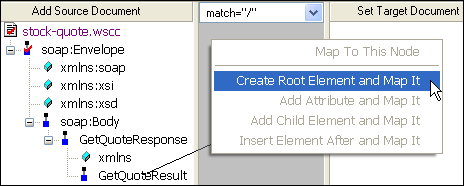
Not sure what your target data model looks like yet? No problem. With <%=ConfigurationManager.AppSettings["SS"]%> you can create or make changes to a target data model as you go — simply drag and drop a source document data node to the target document pane and specify how you want <%=ConfigurationManager.AppSettings["SS"]%> to handle it, as shown in the following illustration. Similarly, if you right click on the target document pane, you can add or insert a child element, add an attribute, delete a node, and so on.
Preserve Mapping Project Layout
<%=ConfigurationManager.AppSettings["SS"]%> ingeniously preserves the exact layout of your XSLT mapping project, without using any additional files. How do we do this? We store meta-information inside the XSLT stylesheet which is ignored by other processors and editors.
Used by thousands of XSLT developers worldwide, <%=ConfigurationManager.AppSettings["SS"]%>'s XSLT Mapper is powerful tool for accelerating your next data integration project - download a free trial today!