Apache FOP
XSL-FO is an XML format used for driving publishing tools. In order to use it a program called a renderer is necessary. The most common target for rendering is the PDF format, although there are other output formats in use such as PCL (HP Printer Control Language) or RTF. An open-source engine is available from the Apache project named FOP that will converts XSL-FO into PDF. This is suitable for use in the following areas:
For many versions now, <%=ConfigurationManager.AppSettings["SS"]%> has included the most stable version of Apache FOP, 0.20.5. (The next version, 0.92 beta, is still in beta form, and is not yet suitable for inclusion. However, it could be downloaded manually and used as an external post-processor with <%=ConfigurationManager.AppSettings["SS"]%>.)
Configuring <%=ConfigurationManager.AppSettings["SS"]%> for Apache FOP Use
To switch to using PDF output, we'll need to get to the Scenarios dialog for the XSLT or XQuery program we're working on. Then go to the "Post-process" tab.
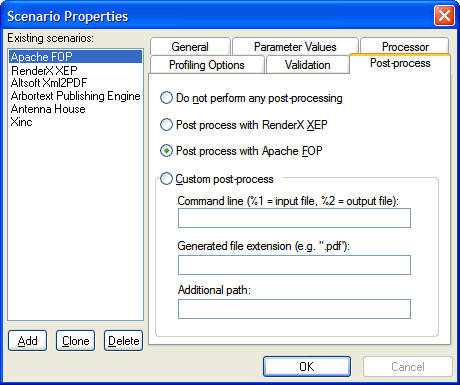
Switch your processing from "Do not perform..." to "Post process with Apache FOP", and you are set to go. (Note that although you can install any XSL-FO to PDF renderer, only Apache FOP and RenderX XEP are included with <%=ConfigurationManager.AppSettings["SS"]%>.)
Now, we are ready to begin actually using <%=ConfigurationManager.AppSettings["SS"]%> and the Apache FOP rendering engine together.
Transforming XML and Rendering the XSL-FO File with Apache FOP
Choose your XSL-FO file. If you were to use the same ones as used on the RenderX XEP demonstration page for this demonstration, you could do File|Open and navigate to the directory in which you unzipped them to get:
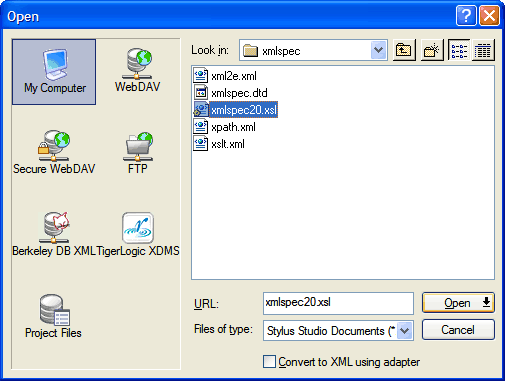
Next, choose the Scenario Properties dialog, either from the XSLT or XQuery menu or
from the  button, and set the Source XML URL.
For the XPath 1.0 specification, choose the
button, and set the Source XML URL.
For the XPath 1.0 specification, choose the xpath.xml file that was in the
same directory as the .xsl file above.
(In your copy, it might be called REC-xpath-19991116.xml)
Next, choose the Post-process tab. There, select "Post process with Apache FOP". That's all it takes to configure FOP to work with <%=ConfigurationManager.AppSettings["SS"]%>.
Now choose XSLT|Preview Result (or XQuery|Preview Result) or click on the  icon,
and the preview window will show the PDF as generated by
<%=ConfigurationManager.AppSettings["SS"]%> driving Apache FOP.
icon,
and the preview window will show the PDF as generated by
<%=ConfigurationManager.AppSettings["SS"]%> driving Apache FOP.
Whether you are interested in XSL-FO, Apache FOP, or <%=ConfigurationManager.AppSettings["SS"]%>, we've got the goods. Try it yourself by heading over to here to download a copy of <%=ConfigurationManager.AppSettings["SS"]%> with Apache FOP, and explore both the XML Editor and the XML Publishing module for designing beautiful XML reports.