Home >Online Product Documentation >Table of Contents >Insert and Populate a Table
Insert and Populate a Table
Next, we add a table based on the video repeating element and populate its columns.
videos node.
video repeating element from the data sources panel and drop it on the XML Publisher canvas.
Stylus Studio creates a three-column table. At this point, the XML Publisher Editor should resemble Figure 528:
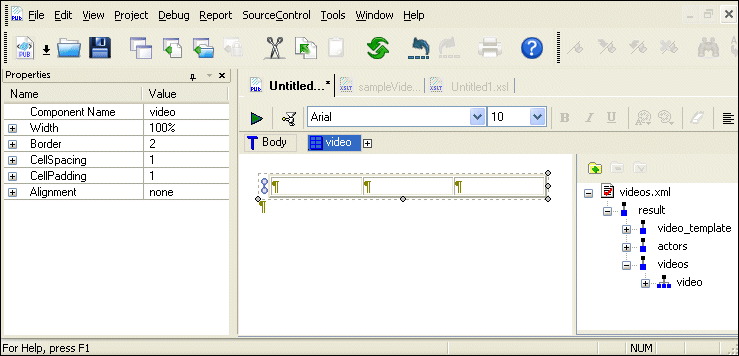
Although the table currently contains no values, if you mouse over the repeating glyph at the left of the table ( ) you will see that it references the
 videos.xml document and that the current XPath expression evaluates the video repeating element (/result/videos/video).
video node in the data sources panel.
title node and drop it in the first column; select Insert Value from the short-cut menu.
A value glyph with the element name appears in the cell.
rating element, dropping it in the second column.
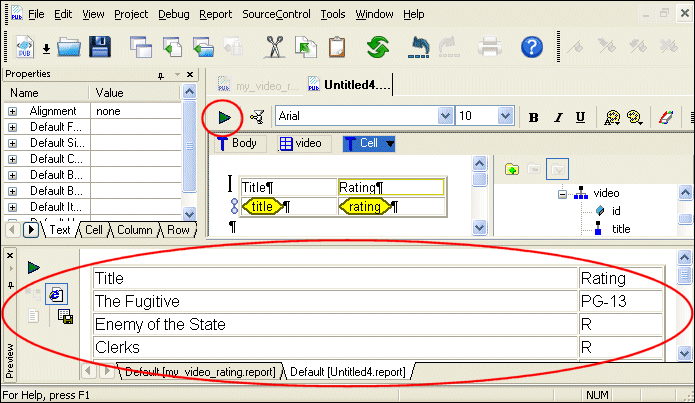
Stylus Studio adds a new row to the table. Note that the new row does not repeat - the repeating glyph is associated only with the second row, the row that contains the data.
 ).
).
Stylus Studio creates a three-column table. At this point, your XML Publisher Editor should resemble this: