Home >Online Product Documentation >Table of Contents >Example: Converting a Conforming EDI File
Example: Converting a Conforming EDI File
This section describes how to convert an EDI file to XML using the Stylus Studio EDI to XML module. It uses the 831.x12 EDI file, which is installed in the \EDItoXML\EDI files folder where you installed Stylus Studio. This file conforms to the X12 EDI standard, and contains no errors.
To convert 831.x12 to XML:
The New EDI to XML Conversion dialog box appears.
831.x12 EDI file.
Alternative: Use the more button ( ) to locate
 831.x12.
When you select the document, X12 is displayed in the Dialect field and 004030 is displayed in the Version field in the Select the dialect and version you need to customize group box.
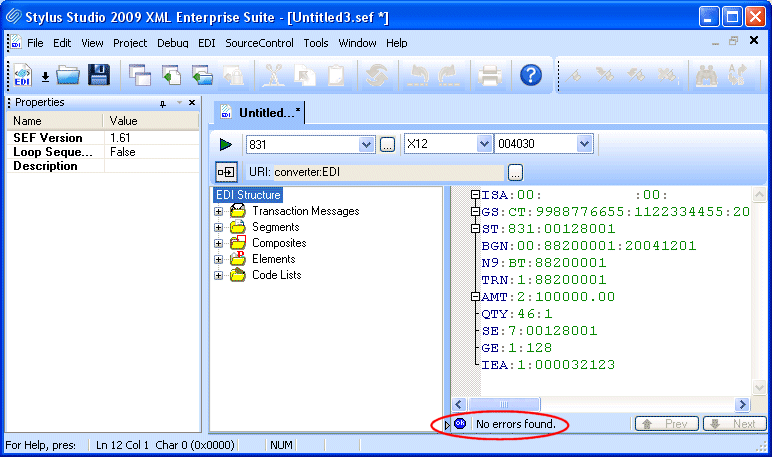
The EDI to XML editor appears. The 831.x12 EDI file you selected in step 2 is displayed in the EDI document pane. The message in the status bar (No errors found) indicates that the 831.x12 EDI file has no errors.
The EDI Structure pane displays information for X12 version 004030 from the DataDirect XML Converter repository. Stylus Studio uses this information to parse and validate the source EDI document associated with this EDI to XML conversion.
Since the 831.x12 EDI file has no errors and appears to conform to the X12 standard, it is ready to be converted to XML. (For information on addressing errors in EDI files, see Resolving EDI Document Errors.)
831.x12 EDI file to XML, click the Preview Result button ( ).
).
The Save As dialog box appears, requesting that you save your EDI to XML conversion as a SEF file.
Stylus Studio opens the Preview window and displays the XML that results from converting the 831.x12 EDI file.
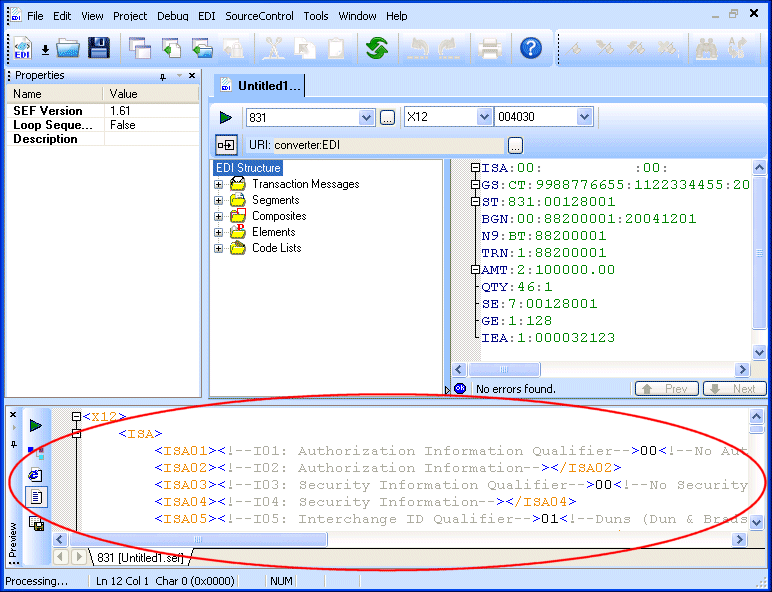
Note that no changes were made to either the EDI structure for the X12 standard or to the default converter settings used by the XML Converter engine (as shown in the URI field). Sometimes you will need or want to create local copies of EDI standards definitions or change properties used by the XML Converter engine. These topics are discussed in the following example, Example: Converting a Non-conforming EDI File, as well as in greater detail in Specifying XML Converter Properties and Customizing an EDI Standard.