Create XML Schema from XML Document Content
<%=ConfigurationManager.AppSettings["SS"]%> provides several utilities to convert files to XML documents — CSV, flat files, and relational ADO files can all be converted to XML with the click of a button. But the power of <%=ConfigurationManager.AppSettings["SS"]%> doesn't stop there — <%=ConfigurationManager.AppSettings["SS"]%> can just as easily generate an industry standard W3C XML Schema (or DTD) by correctly inferring an XML data model from an XML instance document. Start with HTML, and end up with XML Schema or DTD!
Auto-generating an XML Schema with <%=ConfigurationManager.AppSettings["SS"]%> is easy: just load any XML document into <%=ConfigurationManager.AppSettings["SS"]%>'s XML editor and click the Schema tab, located at the bottom of <%=ConfigurationManager.AppSettings["SS"]%>'s XML Editor as shown here:
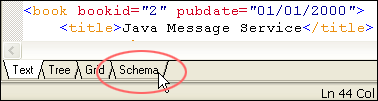
When you click the Schema tab, <%=ConfigurationManager.AppSettings["SS"]%> displays the XML content model (expressed as an XML Schema or DTD) associated with your XML document, if one exists. However, if the XML document doesn't have an associated XML content model, <%=ConfigurationManager.AppSettings["SS"]%> displays a dialog box (shown here) that lets you quickly generate an XML Schema (or DTD). (For more about the Schema tab, see our section on XML editing views.)
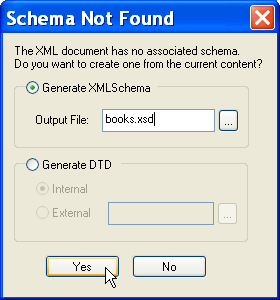
To generate an XML Schema (or DTD), just type a name for the generated file and click OK. That's it. From the XML document you provide, <%=ConfigurationManager.AppSettings["SS"]%> correctly infers XML elements, attributes, relationships, compositor models (for example, Optional, Choice, Sequence), data type (xs:integer, xs:string, for example), element references, and so on. Of course you can further refine the generated XML Schema using our powerful XML Schema Editor.
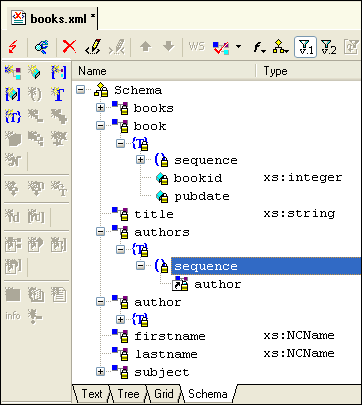 generates complete XML Schema or DTD" width="362" height="405"/>
In addition to generating the XML Schema, <%=ConfigurationManager.AppSettings["SS"]%> inserts the required XML code in the XML document to associate it with its newly generated XML schema, simplifying editing and validating the XML document.
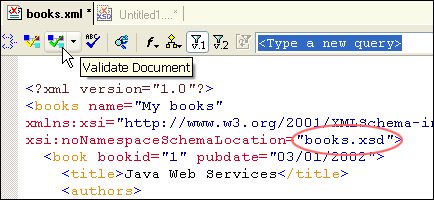
Use <%=ConfigurationManager.AppSettings["SS"]%>'s integrated XML Schema generator (and DTD generator) to further accelerate developing and editing well-formed, valid XML documents.