Learn XQuery in 10 Minutes: An XQuery Tutorial
By: Dr. Michael Kay
UPDATE - This article has been updated since its original publication. You can find the updated version here.
This XQuery tutorial is for all those people who really want to know what XQuery is, but don't have the time to find out. We all know the problem: so many exciting new technologies, so little time to research them. To be honest, I hope that you'll spend more than ten minutes on this XQuery tutorial — but if you really have to leave that soon, I hope you'll learn something useful anyway.
What is XQuery For?
XQuery was devised primarily as a query language for data stored in XML form. So its main role is to get information out of XML databases — this includes relational databases that store XML data, or that present an XML view of the data they hold.
Some people are also using XQuery for manipulating free-standing XML documents, for example, for transforming messages passing between applications. In that role XQuery competes directly with XSLT, and which language you choose is largely a matter of personal preference.
In fact, some people like XQuery so much that they are even using it for rendering XML into HTML for presentation. That's not really the job XQuery was designed for, and I wouldn't recommend people to do that, but once you get to know a tool, you tend to find new ways of using it.
Playing with XQuery
The best way to learn about anything is to try it out. Two ways you can try out the XQuery examples in this article are:
- Install <%=ConfigurationManager.AppSettings["SS"]%> - Then go to File > New > XQuery File... and you can start creating a query in the editor pane. (In <%=ConfigurationManager.AppSettings["SS"]%>, you can also use a visual XQuery mapper to create your queries graphically. If you like that approach, go ahead. But I'm going to concentrate here on the actual language syntax.)
- Download Saxon - Put the saxon8.jar file on your Java classpath.
Then enter your query into a file using your favorite text editor, and on the
command line type:
java net.sf.saxon.Query my.xquery.
Note: <%=ConfigurationManager.AppSettings["SS"]%> is bundled with saxon8.jar (look in the bin directory) and includes integrated support for the Saxon XQuery Processor.
(Between you and me, if you've only got ten minutes, you're not going to have time to install any new software, so just keep reading ...)
Your First XQuery
If you want to know how to do Hello World! in XQuery, here it is:
"Hello World!"and this is the result:
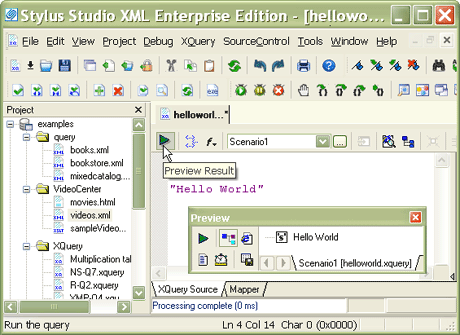
Hello World!This is how it works in <%=ConfigurationManager.AppSettings["SS"]%>:
- Select File > New > XQuery File ...
- Enter the query (as above) into the editing pane
- Select File > Save As ... and choose a file name
- Click the Preview Result button
Game for something more interesting? Try:
2+2
and be amazed by the answer:
4Finally, just to check that things are working properly, enter:
current-time()and you'll see how much time you have left to read the rest of this article:
17:22:04-05:00For that one, of course, mileage may vary. The precision of the time value (fractions of a second) depends on the XQuery processor you are using, and the timezone (5 hours before GMT in this case) depends on how your system is configured.
None of these is a very useful query on its own, of course, and what they demonstrate isn't exactly rocket science.
But within a query language, you need to be able to do little calculations, and XQuery has this covered. Further, XQuery is designed so that expressions
are fully nestable —
any expression can be used within any other expression, provided it delivers a value of the right type —
and this means that expressions that are primarily intended for selecting data within a where clause
can also be used as free-standing queries in their own right.
Accessing XML Documents with XQuery
Though it's capable of handling mundane tasks like those described in the previous section, XQuery is designed to access XML data. So let's look at some simple queries that require an XML document as their input.
The source document we'll use is called videos.xml. It's distributed as an example file with <%=ConfigurationManager.AppSettings["SS"]%>,
and you'll find it somewhere like c:\Program Files\<%=ConfigurationManager.AppSettings["SS"]%> 6 XML Professional Edition\examples\VideoCenter\videos.xml
There's also a copy of this example file on the Web.
XQuery allows you to access the file directly from either of these locations, using a suitable URL
as an argument to its doc() function. Here's an XQuery that simply retrieves and displays the whole document:
doc('file:///c:/Program%20Files/Stylus%20Studio%206%20XML%20Professional %20Edition/examples/VideoCenter/videos.xml')
The same function can be used to get the copy from the Web:
doc('http://www.stylusstudio.com/examples/videos.xml')
(This will only work if you are online, of course; and if you're behind a corporate firewall you may have to do some tweaking of your Java configuration to make it work.)
Those URLs are a bit unwieldy, but there are shortcuts you can use:
- If you're working in <%=ConfigurationManager.AppSettings["SS"]%>, click on XQuery / Scenario Properties, and under Main Input (optional), browse to the input file and select it. You can now refer to this document in your query simply as "." (dot).
- If you're working directly with a command line processor such as Saxon, I suggest that you copy the file to somewhere local, let's say c:\query\videos.xml, and work with it from that location. Use the command line option -s c:\query\videos.xml and you will again be able to refer to the document within your query as "." (dot).
The file contains a number of sections. One of them is an <actors> element, which we can select like this:
.//actorsThis produces the result:
<actors>

    <actor id="00000015">Anderson, Jeff</actor>

    <actor id="00000030">Bishop, Kevin</actor>

    <actor id="0000000f">Bonet, Lisa</actor>

    <actor id="00000024">Bowz, Eddie</actor>

    <actor id="0000002d">Curry, Tim</actor>

    <actor id="00000033">Dullea, Keir</actor>

    <actor id="00000042">Fisher, Carrie</actor>

    <actor id="00000006">Ford, Harrison</actor>

    <actor id="00000045">Foster, Jodie</actor>

...etc...

</actors>
That was our first "real" query. If you're familiar with XPath, you might recognize that all the queries so far
have been valid XPath expressions. We've used a couple of functions — current-time() and doc() — that might
be unfamiliar because they are new in XPath 2.0, which is still only a draft; but the syntax of all the queries so
far is plain XPath syntax. In fact, the XQuery language is designed so that every valid XPath expression is also a valid XQuery query.
This means we can also write more complex XPath expressions like this one:
.//actors/actor[ends-with(., 'Lisa')]
which gives the output:
<actor id="0000000f">Bonet, Lisa</actor>

<actor id="0000001b">Spoonhauer, Lisa</actor>
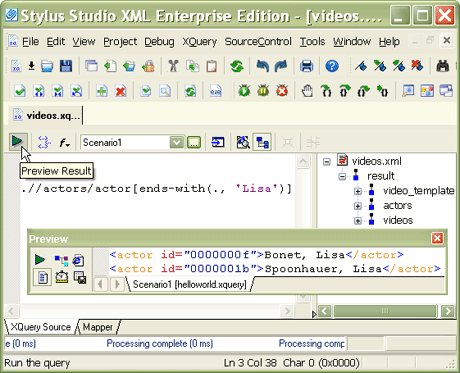
Different systems might display this output in different ways. Technically, the result of this query is a sequence of two element nodes in a tree representation of the source XML document, and there are many ways a system might choose to display such a sequence on the screen. <%=ConfigurationManager.AppSettings["SS"]%> gives you the choice of a text view and a tree view: you use the buttons next to the Preview window to switch from one to the other. Here's what the text view looks like:
 "/>
"/>
This example used another function — ends-with() — that's new in XPath 2.0. We're calling it inside a
predicate (the expression between the square brackets), which defines a condition that nodes must satisfy in order to be selected.
This XPath expression has two parts: a path .//actors/actor that indicates which elements we are interested in,
and a predicate [ends-with(., 'Lisa')] that indicates a test that the nodes must satisfy.
The predicate is evaluated once for each selected element; within the predicate, the expression "." (dot)
refers to the node that the predicate is testing, that is, the selected actor.
The "/" in the path informally means "go down one level", while the "//" means
"go down any number of levels". If the path starts with "./" or ".//" you can leave out the initial "."
(this assumes that the selection starts from the top of the tree, which is always the case in our examples).
You can also use constructs like "/.." to go up one level, and "/@id" to select an attribute.
Again, this will all be familiar if you already know XPath.
XPath is capable of doing some pretty powerful selections, and before we move on to XQuery proper, let's look at a more complex example. Let's suppose we want to find the titles of all the videos featuring an actor whose first name is Lisa. Each video in the file is represented by a video element like this one:
<video id="647599251">

   <studio></studio>

   <director>Francesco Rosi</director>

   <actorRef>916503211</actorRef>

   <actorRef>916503212</actorRef>

   <title>Carmen</title>

   <dvd>18</dvd>

   <laserdisk></laserdisk>

   <laserdisk_stock></laserdisk_stock>

   <genre>musical</genre>

   <rating>PG</rating>

   <runtime>125</runtime>

   <user_rating>4</user_rating>

   <summary>A fine screen adaptation of Bizet's

      popular opera. </summary>

   <details>Placido Domingo does it again, this time

      in Bizet's popular opera.</details>

   <vhs>15</vhs>

   <beta_stock></beta_stock>

   <year>1984</year>

   <vhs_stock>88</vhs_stock>

   <dvd_stock>22</dvd_stock>

   <beta></beta>

</video>
We can write the required query like this:
//video[actorRef=//actors/actor[ends-with(., 'Lisa')]/@id]/title
Again, this is pure XPath (and therefore a valid XQuery). You can read it from left-to-right as:
- Start at the implicitly-selected document (videos.xml)
- Select all the
<video>elements at any level - Choose those that have an
actorRefelement whose value is equal to one of the values of the following:- Select all the
<actors>elements at any level - Select all their
<actor>child elements - Select the element only if its value ends with 'Lisa'
- Select the value of the
idattribute
- Select all the
- Select the
<title>child element of these selected<video>elements
The result is:
<title>Enemy of the State</title>

<title>Clerks</title>
Many people find that at this level of complexity, XPath syntax gets rather mind-boggling. In fact, this example is just about stretching XPath to its limits. For this kind of query, and for anything more complicated, XQuery syntax comes into its own. But it's worth remembering that there are many simple things you can do with XPath alone, and that every valid XPath expression is also valid in XQuery. Note that <%=ConfigurationManager.AppSettings["SS"]%> also provides a built-in XPath analyzer for visually editing and testing complex XPath expressions, and it supports both version 1.0 and 2.0.
XQuery FLWOR Expressions
If you've used SQL, then you will have recognized the last example as a join between two tables, the videos table and the actors table. It's not quite the same in XML, because the data is hierarchic rather than tabular, but XQuery allows you to write join queries in a similar way to the familiar SQL approach. Its equivalent of SQL's SELECT expression is called the FLWOR expression, named after its five clauses: for, let, where, order by, return. Here's the last example, rewritten this time as a FLWOR expression:
let $doc := .

for $v in $doc//video,

    $a in $doc//actors/actor

where ends-with($a, 'Lisa')

    and $v/actorRef = $a/@id

return $v/title
And of course, we get the same result.
Let's take apart this FLWOR expression:
- The
letclause simply declares a variable. I've included this here because when I deploy the query I might want to set this variable differently; for example, I might want to initialize it todoc('videos.xml'), or to the result of some complex query that locates the document in a database. - The
forclause defines two range variables: one processes all the videos in turn, the other processes all the actors in turn. Taken together, the FLWOR expression is processing all possible pairs of videos and actors. - The
whereclause then selects those pairs that we are actually interested in. We're only interested if the actor appears in that video, and we're only interested if the actor's name ends in 'Lisa'. - Finally the
returnclause tells the system what information we want to get back. In this case we want the title of the video.
If you've been following very closely, you might have noticed one little XPath trick that we've retained in this query.
Most videos will feature more than one actor (though this particular database doesn't attempt to catalog the bit-part players).
The expression $v/actorRef therefore selects several elements. The rules for the = operator in XPath
(and therefore also in XQuery) are that it compares everything on the left with everything on the right and returns
true if there's at least one match. In effect, it's doing an implicit join. If you want to avoid exploiting this feature,
and to write your query in a more classically relational form, you could express it as:
let $doc := .

for $v in $doc//video,

    $va in $v/actorRef,

    $a in $doc//actors/actor

where ends-with($a, 'Lisa')

    and $va eq $a/@id

return $v/title
This time I've used a different equality operator, eq, which follows more conventional rules than = does:
it strictly compares one value on the left with one value on the right. (But like comparisons in SQL, it has special
rules to handle the case where one of the values is absent.)
What about the O in FLWOR? That's there so you can get the results in sorted order. Suppose you want the videos in order of their release date. Here's the revised query:
let $doc := .

for $v in $doc//video,

    $a in $doc//actors/actor

where ends-with($a, 'Lisa')

    and $v/actorRef = $a/@id

order by $v/year

return $v/title
And if you're wondering why it isn't a LFWOR expression: the for and let clauses can appear in any order,
and you can have any number of each. That, and LFWOR doesn't exactly fall trippingly off the tongue, now does it?.
There's much more to the FLOWR expression then what's covered in this brief XQuery tutorial — for more information
be sure to check out the XQuery FLWOR tutorial.
Generating XML Output with XQuery
So far all the queries we've written have selected nodes in the source document. I've shown the results as if the system copies the nodes to create some kind of result document, and if you run Saxon from the command line that's exactly what happens; but that's simply a default mode of execution. In a real application you want control over the form of the output document, which might well be the input to another application — perhaps the input to an XSLT transformation or even another query.
XQuery allows the structure of the result document to be defined using an XML-like notation. Here's an example that fleshes out our previous query with some XML markup:
declare variable $firstName   as xs:string external;

<videos featuring="{$firstName}">

{

   let $doc := .

   for $v in $doc//video,

      $a in $doc//actors/actor

   where ends-with($a,  $firstName)

      and $v/actorRef = $a/@id

   order by $v/year

   return

      <video year="{$v/year}">

         {$v/title}

      </video>

}

</videos>
I've also changed the query so that the actor's first name is now a parameter. This makes the query reusable.
The way parameters are supplied varies from one XQuery processor to another. In <%=ConfigurationManager.AppSettings["SS"]%>,
select XQuery > Scenario Properties; click the Parameter Values tab,
and you'll see a space to enter the parameter value. Enter "Lisa", in quotes
(<%=ConfigurationManager.AppSettings["SS"]%> expects an expression, so if you leave out the quotes, this value would be taken as a reference to an element named <Lisa>).
If instead you're running Saxon from the command line, you can enter:
java net.sf.saxon.Query sample.xquery firstName=LisaThis is how the output looks now:
<videos featuring="Lisa">

   <video year="1999">

      <title>Enemy of the State</title>

   </video>

   <video year="1999">

      <title>Clerks</title>

   </video>

</videos>
(Not a very well-designed query, since the two videos feature different actresses both named Lisa; but if your ten minutes aren't up yet, perhaps you can improve it yourself.)
Show Me the Database!
I started by saying that the main purpose of XQuery is to extract data from XML databases, but all my examples have used a single XML document as input.
People sometimes squeeze a large data set (for example, a corporate phone directory) into a single XML document, and process it as a file without the benefit of any database system. It's not something I'd particularly recommend, but if the data volumes don't go above a few megabytes and the transaction rate is modest, then it's perfectly feasible. So the examples in this introduction aren't totally unrealistic.
If you've got a real database, however, the form of the queries won't need to change all that much from these
examples. Instead of using the doc() function (or simply ".") to select a document, you're likely
to call the collection() function to open a database, or a specific collection of
documents within a database. The actual way collections are named is likely to vary from one
database system to another. The result of the XQuery collection() function is a set of documents
(more strictly, a sequence of documents, but the order is unlikely to matter), and you can
process this using path expressions or FLWOR expressions in just the same way as you address a single document.
There's a lot more to databases than doing queries, of course. Each product has its own ways of setting up the database, defining schemas, loading documents, and performing maintenance operations such as backup and recovery. XQuery currently handles only one small part of the job. In the future it's also likely to have an update capability, but in the meantime each vendor is defining his own.
One particularly nice feature of XQuery is that it has the potential to combine data from multiple databases (and freestanding XML documents). If that's something you're interested in, take a look at DataDirect XQuery™, which supports access to Oracle, DB2, SQL Server and Sybase.
Time's Up!
Congratulations on finishing XQuery in 10 Minutes. As you might have suspected, there's more to XQuery than we had time to present in this brief XQuery primer. But this XQuery tutorial is just the first in a series of upcoming technical XQuery articles that we plan to make available through the <%=ConfigurationManager.AppSettings["SS"]%> newsletter, the Stylus Scoop. So if you're interested in learning more, sign up for the Stylus Scoop. We'll feature new XQuery articles each month, for example, this new FLWOR tutorial, as well as information on other topics of interest to the XML-curious, too!
Can't wait that long? Then check out the XQuery tutorial written by Jonathan Robie of DataDirect Technologies™, the first chapter of the book XQuery from the Experts, which provides an in-depth understanding of the design behind the XQuery language. The book also contains a chapter by the author of this article, Michael Kay, about the relationship of XQuery to XSLT. It's a great way to get your feet wet with this powerful new XML technology.
If you want to get your hands dirty right away, <%=ConfigurationManager.AppSettings["SS"]%> provides a ton of XQuery tools, including an XQuery editor, an XQuery Debugger with integrated support for the Saxon XQuery Processor, an XQuery Mapper for visually developing XQuery projects, and an XQuery Profiler for benchmarking and optimizing XQuery expressions. Best of all, <%=ConfigurationManager.AppSettings["SS"]%> provides several online video demonstrations to get you aquainted with these and other tools, and you can try out <%=ConfigurationManager.AppSettings["SS"]%> for free.
Finally, if you're more academically inclined, you can find the XQuery specification itself at http://www.w3.org/TR/XQuery. As standards documents go, it's actually quite readable,
and it has lots of examples. The specification is part of a raft of documents on XQuery, which are all listed in its References section,
but the one you're likely to find especially useful is the Functions and Operators specification at
http://www.w3.org/TR/xpath-functions. This document lists all the functions in the XQuery library, but a word of warning —
only those prefixed fn: are directly available to end users. (You'll often see XQuery users writing the fn: prefix,
but it's never necessary.)