<%@ page language="C#" masterpagefile="~/templates/Documentation.master" inherits="Page" pagetitle="Correcting Dialect and Version Errors" keywords="Correcting Dialect and Version Errors"%>

Correcting Dialect and Version Errors

To correct a dialect or version error, right-click the line with the red or yellow background in the EDI document pane and choose the appropriate fix from the shortcut menu:

Figure 203. Fixing a Version Error

Stylus Studio changes the value in the Select Dialect or Select Version fields at the top of the EDI to XML editor and the red or yellow background is cleared.

Note that you can change the dialect and version manually any time you need using the drop-down lists:
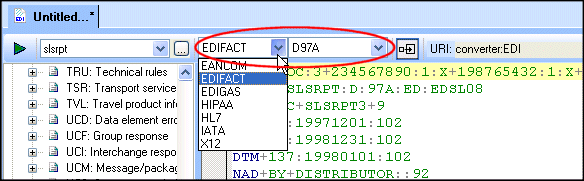
Figure 204. Dialect and Version Fields

Note


When the SEF file is being used to convert an EDI document to XML, whether in Stylus Studio or programmatically, using DataDirect XML Converter, the EDI standard declared in the EDI document - and not the values shown in the EDI to XML editor - establishes the dialect and version used to parse the document for conversion. Any locally defined definitions in the SEF file are used during the conversion as well.