Home >Online Product Documentation >Table of Contents >Predicate Blocks
Predicate Blocks
A predicate allows you to filter data returned from an XQuery. For example, in books.xml, you might want to return only those books whose bookid attribute was within a specified range of values. In Stylus Studio, you can display (and create) predicates as predicate blocks in XQuery Mapper.
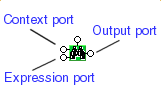
A predicate block in XQuery Mapper is rendered as a pair of binoculars. It has two input ports - Context (shown as data in the predicate block's tool tip) and Expression - and a single Return port, as shown in this example of a greater than block.
Enabling Predicate Blocks
You can create predicates in the XQuery source at any time, but if you want them displayed in the Mapper canvas and/or you want to be able to create them graphically, you need to first enable them.
To enable predicate blocks:
Predicates will be displayed in the next XQuery file you open in Stylus Studio.
Creating a Predicate Block
To create a predicate block:
Example
Following is a simple example that selects all books books.xml whose bookid attribute equals 2. This example uses the books.xml and catalog.xml files in the simpleMappings folder in the examples project.
books.xml to the Add Source Document pane, and drag and drop catalog.xml to the Set Target Document pane.
title to Title.
The predicate block appears on the Mapper canvas.
book elements, drag book to the predicate block's Context port.
Next, we use the conditional block to create predicate expression (that is, "only those book elements whose bookid attribute equals 2").
The equal block appears on the Mapper canvas.
bookid to the first input port on the equal block.
title to Title.
At this point, your diagram should look something like this.
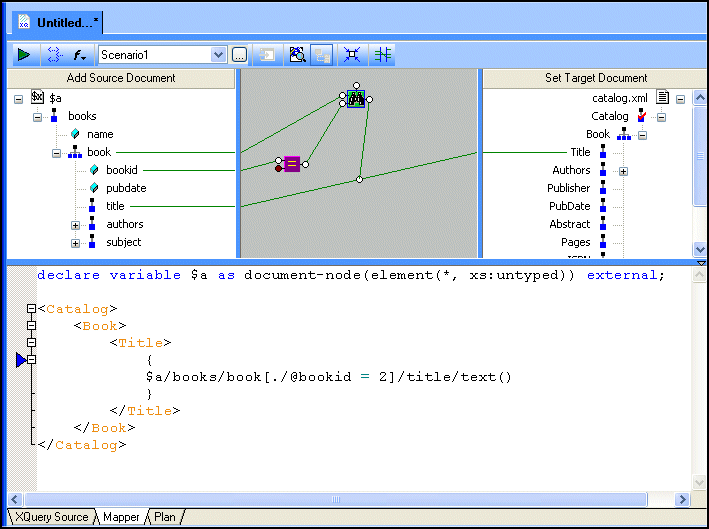
As you can see, Stylus Studio created the predicate, [./@bookid = 2], as part of the XPath expression used to query books.xml. (Note that we defined the document using the variable $a to simplify the XPath expression.)
 ).
).
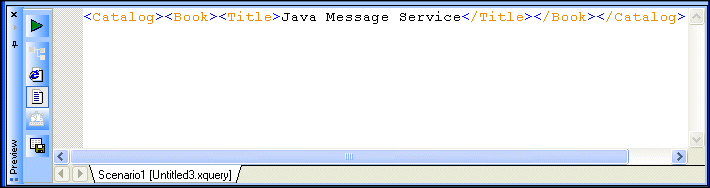
The result appears in the Preview window: