XML Processing
When XML is processed, usually there is more to it than one input, on transform, and one output. Rarely is the input in exactly the right format, and rarely can the output be put right where it belongs. And seldom is the transformation which does not require lookups or including data from other sources.
XML Processors Defined
When people speak of 'XML processors' they often mean programs that work with XML. These can include
- validators,
- XSLT and XQuery transformers,
- adapters,
- control structures,
- and maybe relational data sources and
- web service invocations also.
Using these together as building blocks, powerful and maintainable XML Pipelines can be build for managing anything that even remotely resembles XML.
"The whole is greater than the sum of its parts"
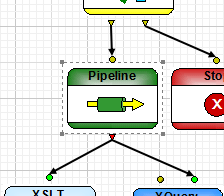
Pipelines can contain other pipelines. Each pipeline can have any number of input and output "ports" that can be used to connect them together.
Because they can be included within each other, you can break apart tasks by function, and even reuse pipelines within other projects.
Besides using XML Pipelines themselves as building blocks, there are several other classes components that can be used.
XML Processing Frameworks
<%= ConfigurationManager.AppSettings["SS"] %> supports building using a variety of frameworks, each of which includes its own components. The idea is that we use off-the-shelf or platform components targeted for each execution environment, and supply the missing pieces to round out the package.
Current frameworks include:
- Stylus Studio's native engines
- DataDirect XQuery
- Saxonica Saxon-B
- Saxonica Saxon-SA
- Microsoft .Net (System.Xml)
- Xerces or Xalan
- and a Custom option which lets you tweak the settings.
XML Processing Control Structures
In addition to being able to route queries by XPath, conditions can be forced to emit warnings or even to stop the pipeline with an error. This is valuable where you want to validate some data flowing into or out of steps.
XML Processing with Validators
Both Saxonica and Xerces have produced excellent XML Schema validators, and we let you choose which you want to entrust your data to.
XML-FO Processing
XSL-FO, whether generated directly or via the XML Publishing and Reporting module, is the perfect vehical for cross-platform document delivery. The deployer lets you choose between the bundled RenderX XEP and Apache FOP processors.
XML XQuery Processing
You can choose Saxonica's Saxon XQuery engine, in either Basic or Schema-Aware mode, or the DataDirect XQuery engine for deployment. Both are strong and standards-conformant choices.
XML XSLT Processing
We're happy to deploy Saxon 6.x, 8.x or Xerces-J XSLT engines, so you may choose whether you need the simplicity of XSLT 1.0, or the power of XSLT 2.0.
XML Adapters Processing
Any of the adapters available can be used as input or output to any of the steps in a pipeline, allowing XML Processing to extend even to non-XML data, such as EDI and flat files.
XML and Relational Data Processing
Using DataDirect XQuery — with its unequaled highly-performant embedded database drivers — access to Oracle, SQL Server, Sybase and DB/2 will scream — and in a good way, not like this.
XML Web Services Processing
The <%= ConfigurationManager.AppSettings["SS"] %> Web Service Call Composer lets you build and test a call to a web service. Those saved call references can be included and executed as part of a pipeline.
For more information about how to simplify XML processing with XML Pipeline, watch a brief 4-minute introductory video tutorial entitled: Visual Data Integration with XML Pipeline, or simply download a free trial today.