Stylus Studio 2007 XML Enterprise Suite Released: XML Pipeline, XML Publisher and Data Conversion API's
Dear Stylus Studio Friend,
Stylus Studio 2007 XML Enterprise Suite is now available for purchase or for free trial download. It's the biggest release ever in Stylus Studio's 10-year history, with all-new tools for XML Pipelining, XML Publishing, powerful new Data Conversion APIs and so much more. Read on for more information, or skip to the chase and just download it now!
To celebrate this historic release, we have significantly cut our prices across-the-board to ensure that everyone can benefit from these incredible new tools. Ask yourself: why pay thousands of dollars for an enterprise XML tools suite when you can get so much power, flexibility, and value with Stylus Studio 2007 XML Enterprise Suite. In closing, we thank you for your continued support and look forward to once again earning your business this year!
Sincerely,Ivan Pedruzzi
Sr. Product Architect
The Stylus Studio Team
Table of Contents:
- Stylus Studio 2007 XML Enterprise Suite Released
- Stylus Studio Announces Significant Price Reductions
- New Videos for XML Pipeline and XML Publisher
- Using SQL and XQuery by Dr. Michael Kay
- True Stylus Studio Stories!
1) Stylus Studio 2007 XML Enterprise Suite Released
Think of the last XML application that you worked on: it probably involved converting some legacy data to XML, validating it, querying a database, publishing data to either HTML or PDF using either XSLT or XSL:FO, or performing any number of other XML operations. Taken individually, these processing tasks can be complex and error-prone. And linking them together so that they form a single seamless XML application, daunting, to say the least.
All this changes with the Stylus Studio's new XML Pipeline Editor, a graphical editor that lets you specify and link together any number of XML operations to be applied to your data, including parsing, validating, converting, transforming, publishing, and many others.
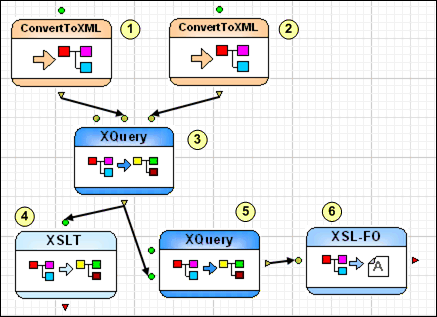
Using XML Pipeline to Develop XML Applications
Here are just some of the intuitive features that will make your next XML application development effort a snap!
- Visual Editor: Create XML data sources, XML processing operations, and application logic with easy drag-and-drop operations using existing XML documents like XQuery, XSLT, and XML Schema.
- Advanced Flow Control: Iterate over the entire XML pipeline or individual steps; use validation or XPath expressions to control the flow of your XML pipeline based on conditions that you set.
- Pipeline Execution: Run the entire XML pipeline from start to finish, and view the output of every stage along the way.
- XML Pipeline Debugging: Integrated debugging support lets you set a breakpoint on any block, run the pipeline, and then step through the XML pipeline to eliminate bugs. A cross-language debugger, fully integrated with our XSLT debugger and XQuery debugger, helps you seamlessly step into XSLT and XQuery file and Java functions from within the XML pipeline, and return to the XML pipeline once you're done.
- Nested Pipelines: Advanced applications can take advantage of support for nested pipelines – XML pipelines that include, or are included in, other XML pipelines – by letting you modularize and re-use XML pipeline code to simplify XML application development.
- Code Generation: You can generate the Java code to run the entire XML pipeline with a single click. The generated Java code is highly scalable and configurable – Stylus Studio lets you specify an execution framework using all the popular XML processors including DataDirect XQuery, Apache Xalan, Apache Xerces, Microsoft .NET, MSXML, Saxon XSLT, Saxon XQuery, RenderX XEP, XSV, and others.
The Stylus Studio XML Pipeline Editor is the first XML development tool to provide such comprehensive and integrated tools for modeling, editing, debugging, and deploying your entire XML application, and not just individual pieces that you later have to find a way to make work together. The XML Pipeline Editor automates the work required to make XML work in the real world. Simplify XML programming with the XML Pipeline Editor today!
Also brand-new with Stylus Studio 2007 XML Enterprise Suite is XML Publisher, a powerful XML report designer that helps users to create advanced document layouts for use in single-source publishing, XML content management, and multi-channel publishing applications. Using an intuitive visual interface, business users can easily design rich document layouts to publish XML content to PDF, HTML, Postscript, and many other document formats using XSLT 1.0, XSLT 2.0, or XQuery 1.0. You can create reports from the data stored! in numerous heterogeneous data sources, including relational databases; XML databases; Web services; EDI, EDIFACT, X12, CSV and other flat file formats; as well as XML and XML Schema documents. And you can use the XML reports that you create in XML Publisher inside an XML pipeline - so publish away with the new XML Publisher in Stylus Studio 2007 XML Enterprise Suite.
We've also added some significant enhancements to our XML Converters, including new Data Conversion APIs – these are scalable XML converters for reading and writing different legacy file formats such as EDI (EDIFACT, X12, IATA, or EANCOM), CSV, dBase, binary, or any other file format. If you're dissatisfied using a desktop application to manually cut and paste results every time you need to convert some data from one format or another, or if you need to invoke data conversions programmatically, inside your application code for use in a live application, then check out DataDirect XML Converters!
You could keep reading about the exciting developments in Stylus Studio 2007 XML Enterprise Edition, but why not see for yourself by watching the new video demonstrations , downloading a free trial or purchasing Stylus Studio today!
2) DataDirect Announces Dramatic Stylus Studio Price Reductions!
DataDirect has reduced prices for our award-winning XML IDE! This year, get more Stylus Studio for less! Curious? We've prepared a list of Frequently Asked Questions about the incredible Stylus Studio 2007 XML Enterprise Suite price roll-back.
Q: How much does Stylus Studio cost?
A: We've reduced our list prices, and for this week only we're offering special introductory pricing for even greater savings over last year's prices. For example, here's what a single-user license would cost:
| Product Name | Introductory Sale Price |
| Stylus Studio 2007 XML Enterprise Suite | $595 (Save $300) |
| Stylus Studio 2007 XML Professional Suite | $350 (Save $150) |
| Stylus Studio 2007 XML Home Edition | $49 (Save $100) |
Q: I'm confused - don't prices usually increase each year?
A: Frequent price increases in the XML tools industry have been the standard for as long as we can we can remember. But we're proud to say that this lamentable trend ends with the release of Stylus Studio 2007 XML Enterprise Suite!
Q: So, I get all of these powerful XML tools in one comprehensive, all-inclusive Enterprise XML tools suite?
A: Yes. The new tools (XML Pipeline Editor, XML Publisher, and more) are all included with Stylus Studio 2007 XML Enterprise Suite, and there is no need to purchase a bunch of different XML tools separately.
Q: Why is Stylus Studio reducing prices?
A: Because we're so excited about this historic new release. We think it's so much better than anything else out there, and we want everyone to use it. Enterprise XML Suites for all!
Q: What about volume discounts? How much would it cost to outfit my entire development organization with Stylus Studio?
A: We offer significant new volume discounts. A medium-sized company could equip an army of 50 software developers with Stylus Studio 2007 XML Enterprise Suite for just $22,313. For your convenience the volume discount schedule is posted here:
| Number of Users | Volume Discount |
| 2 | 2.0% |
| 5 | 5.0% |
| 10 | 10.0% |
| 20 | 20.0% |
| 50 | 25.0% |
| 100 | 30% |
| +100 | Call or Email Us |
Q: OK – Stylus Studio's comprehensive, innovative, and productive Enterprise XML Tools Suite is now offered at an incredible value-price.
A: That's not really a question, but we'll answer it anyway: Yes!
3) New Videos for XML Pipeline and XML Publisher
Grab a date, some popcorn, and cozy up to new videos that will get you acquainted with two of Stylus Studio 2007 XML Enterprise Edition's most exciting new features.
- An Introduction to XML Pipeline: Covers how easy the XML Pipeline Editor makes building and generating code for XML pipeline applications.
- An Introduction to XML Publisher: Shows you how to design and generate XQuery and XSLT code for HTML+CSS and XSL-FO reports that use any XML data source – XML Schema, CSV, EDI, relational, and more.
4) Using Relational Data in XML Applications - By Dr. Michael Kay
Do you need to work with Relational and XML Data, but you're not sure where to start? Read Using Relational Data in XML Applications by Dr. Michael Kay. This tutorial provides an overview of the most common use cases in which you're likely to use Relational and XML data together, and provides Michael Kay's personal insight into the benefits and drawbacks of different approaches, including new XQuery technologies. Relational databases are here to say, so bootstrap your future and read this article today!
5) True Stylus Studio Stories
Neil Walters of Mostly BizTalk Blogs writes:
I keep Stylus Studio open on my Windows desktop all day. I'm constantly copying XML fragments into it, formatting them, and using the XPath "tester" utility. With Stylus Studio, you can also go into tree or grid mode, click a node, then right click to create the XPath. This is a big time saver for testing XPath first, outside of compiling and testing a huge Biztalk orchestration.
... I use the Stylus Studio XSLT debugger to write and test it, then I set the "Custom XSLT Path" property in Biztalk (and no longer use the Biztalk mapping grid) ...You can also play with XQuery in Stylus Studio. At my past consulting client, we used this (and a little java routine) to create queries that could search through a directory of hundreds of XML messages and find messages that met specific criteria.
I have also got many good tips from the Stylus Studio forums. They are great at answering questions, and often I get an answer the same day.
Thousands of XML developers are switching to Stylus Studio each week! Visit the new and improved XML Product Education Center where users like you debunk the myths, hype, and other common misunderstandings about XML development tools and components. Got a story of your own? Tell us why you use Stylus Studio and we'll respond!